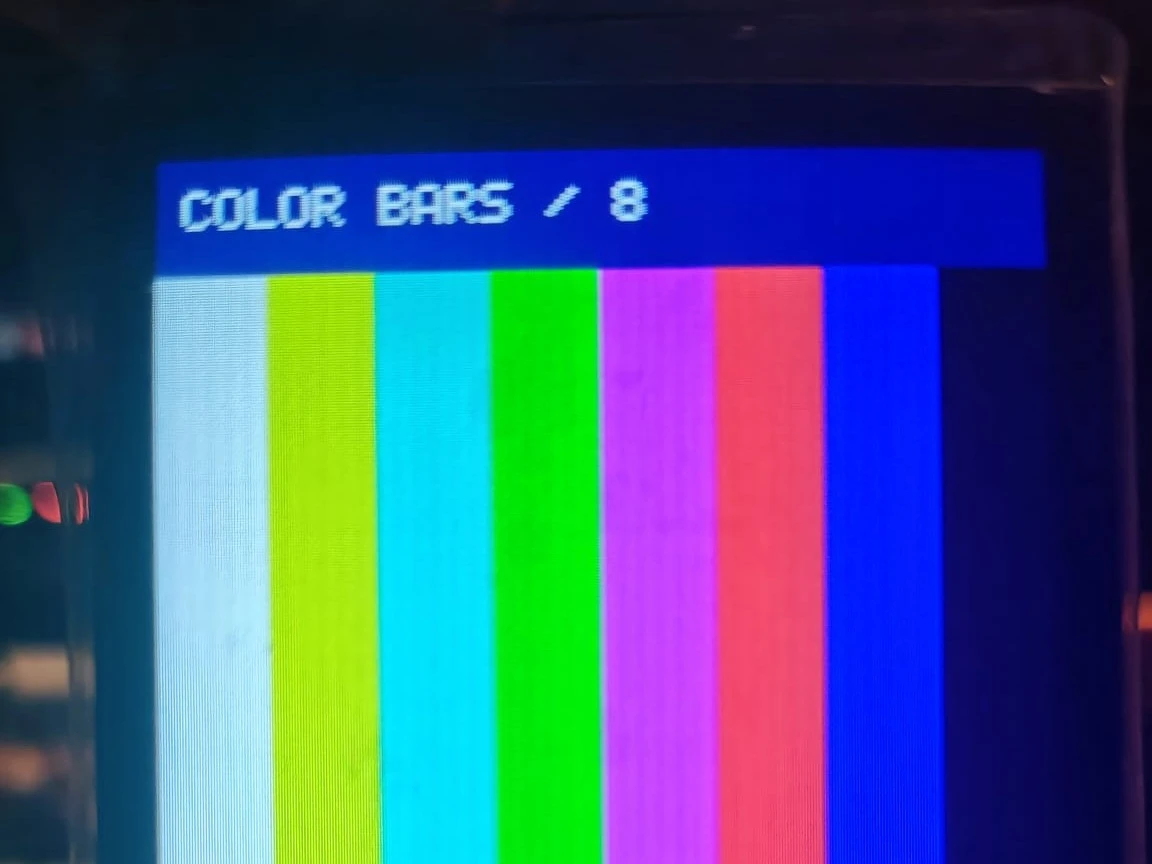
目的
我正在做一个项目,需要高性能单片机,同时要很多引脚,因此选了这个 ESP32-P4。
搭建
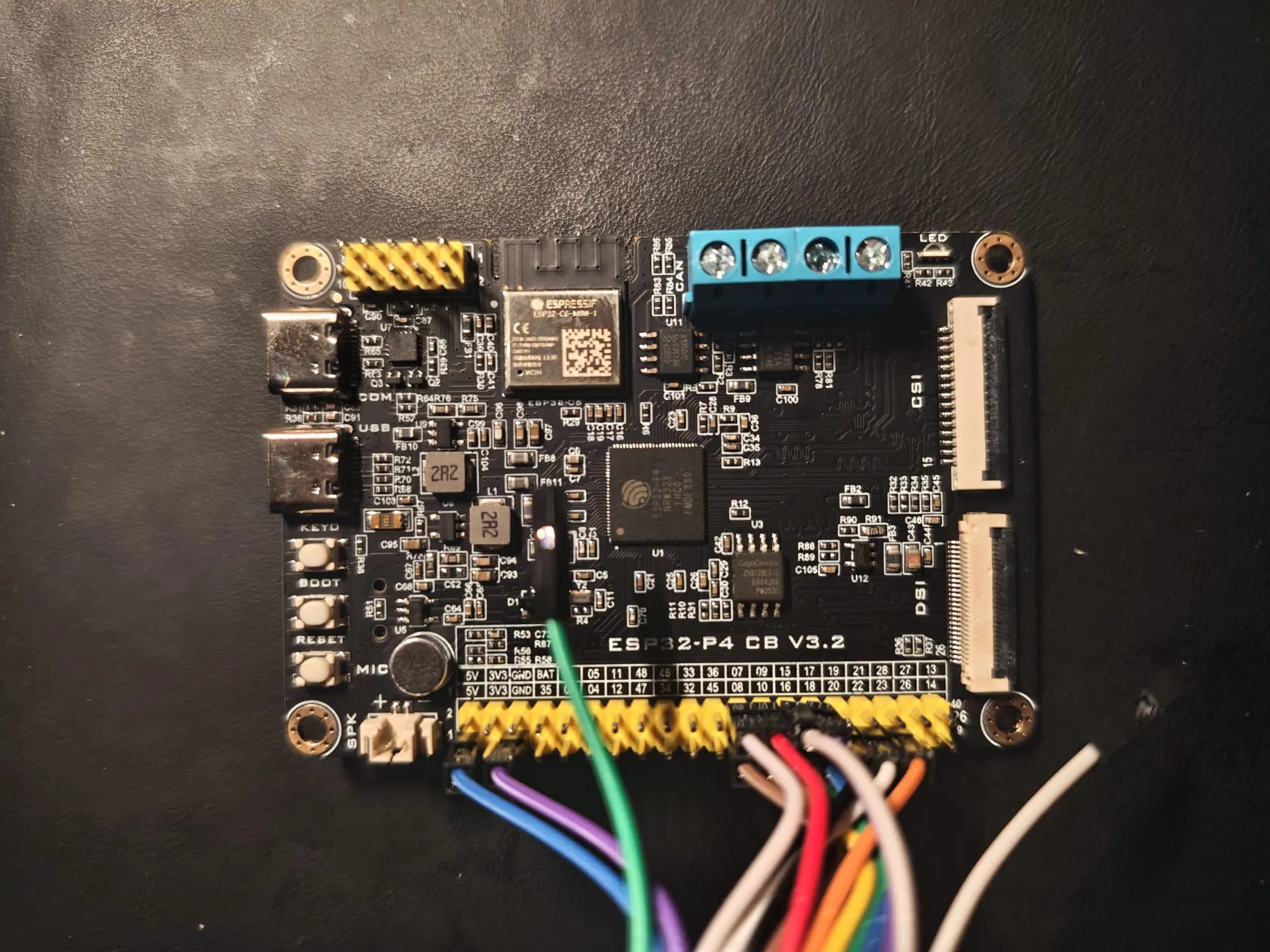
- 主控板:慧勤智远 ESP32-P4 CB V3.2,ESP32-P4NRW32X,32MB PSRAM,16MB Flash。
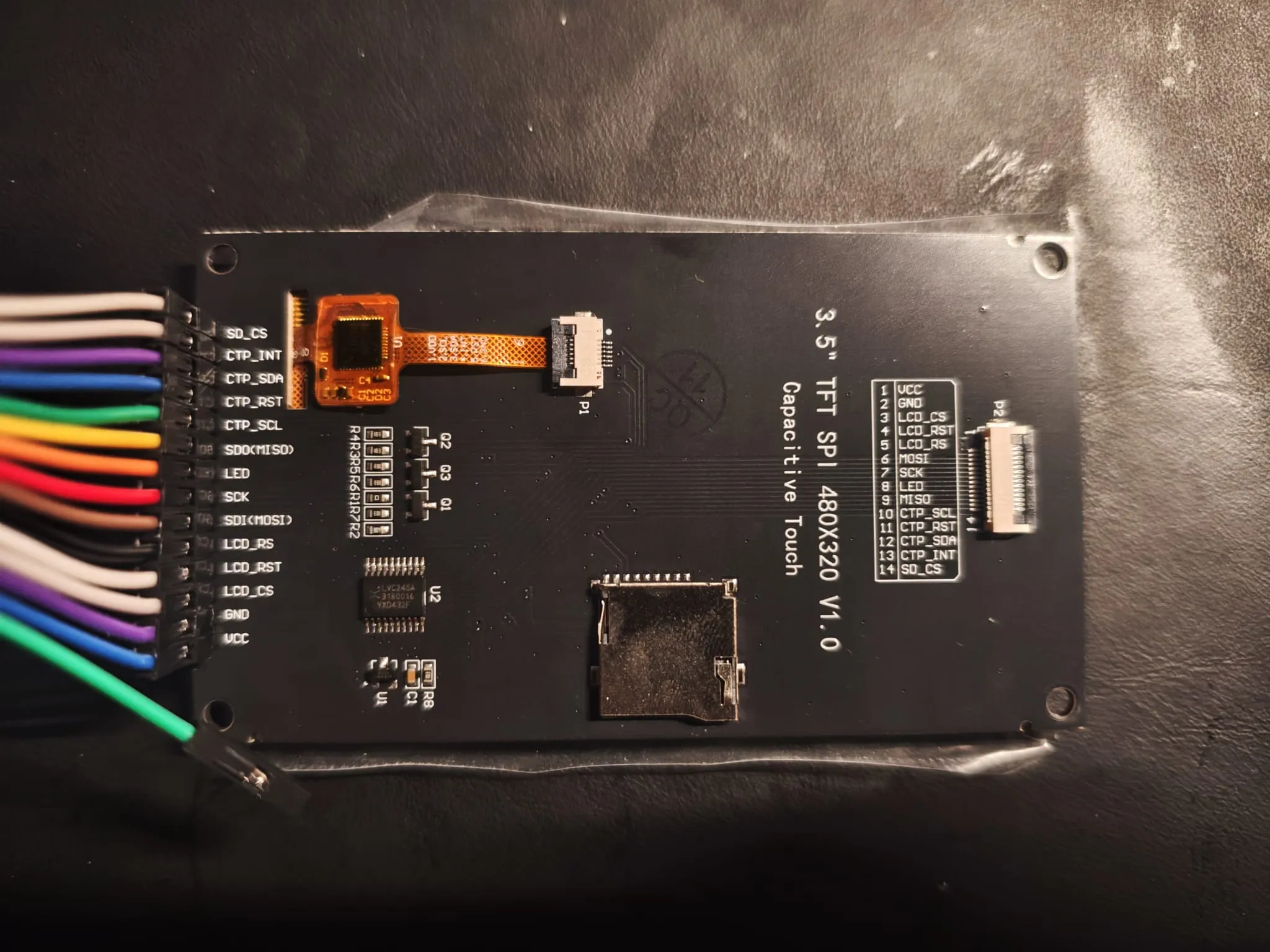
- 屏:LCDWIKI MSP3526,3.5 寸 IPS,320x480,ST7796,4 线 SPI,FT6336U 电容触摸。
- 工具链:Arduino-ESP32 3.3.11,开发板
ESP32P4 Dev Module,芯片版本v3.00 or newer,开启 PSRAM。 - 程序:一个 .ino,没有第三方库。ST7796 的初始化序列照抄屏厂文件,文字用 5x7 点阵。
P4 板上那个 2x10 的 20Pin 屏座是给双排插头用的,这块模块是单排 14Pin,插不进去。我把 J2 用杜邦线接到板子底部的 GPIO 排针,5V 和 GND 也从同一排取。
| 信号 | J2 | GPIO |
|---|---|---|
| LCD_CS | 3 | 7 |
| LCD_SDI | 6 | 8 |
| LCD_SCK | 7 | 9 |
| LCD_RST | 4 | 22 |
| LCD_SDO | 9 | 10(可不接) |
| CTP_INT | 13 | 15 |
| CTP_SCL | 10 | 16 |
| CTP_SDA | 12 | 17 |
| CTP_RST | 11 | 18 |
| LCD_RS | 5 | 20 |
| LED | 8 | 23 |
| VCC | 1 | 5V |
| GND | 2 | GND |
代码
完整程序在下面,一个 .ino,没有第三方库。里面有引脚配置、屏厂的 ST7796 初始化序列、lcdSetWindow()、几个测试画面和 I2C 扫描。
展开完整代码(783 行)
/*
 * ============================================================================
 *  ESP32-P4 CB V3.2  +  3.5" SPI 屏(ST7796U / 320x480)点屏自检程序
 * ----------------------------------------------------------------------------
 *  能点两种 3.5" 320x480 ST7796 屏,信号完全一样:
 *    ① WKS35HV031-WCT:20Pin 2.54 双排针,直接插 P4 板底部 "SPI 屏接口-20Pin"
 *    ② LCDWIKI MSP3525 / MSP3526:14Pin 2.54 单排(J2)或 14P 0.5mm FPC(P2),
 *       用杜邦线接到 P4 底部的 GPIO 排针(J2 与 P2 脚序相同,二选一)
 *
 *  依赖:只用 Arduino-ESP32 核心自带的 SPI / Wire / LEDC,不需要装任何第三方库。
 *       核心版本 >= 3.3.0(ESP32-P4 从 3.3.0 起进入 Arduino 官方支持)。
 *
 *  开发板设置(Arduino IDE):
 *    开发板        ESP32P4 Dev Module
 *    ChipVariant   v3.00 or newer      (这块板是 NRW32X / 400MHz,属于 v3)
 *    PSRAM         Enabled
 *    Flash Size    16MB
 *    USB Mode      Hardware CDC and JTAG 或默认均可(烧录走 CH343P 串口)
 *    端口          CH343P 对应的 COM 口
 *
 *  接线(J2 14Pin -> P4 GPIO 排针,按 GPIO 号接;括号里是 20Pin 屏座的脚号):
 *    LCD_CS  -> GPIO7  (5)     LCD_RST -> GPIO22 (9)
 *    LCD_SDI -> GPIO8  (6)     LCD_RS  -> GPIO20 (17)
 *    LCD_SCK -> GPIO9  (7)     LED     -> GPIO23 (18)
 *    LCD_SDO -> GPIO10 (10)    VCC 5V  -> 5V     (1/2)
 *    CTP_SCL -> GPIO16 (12)    GND     -> GND    (3/4/16/20)
 *    CTP_SDA -> GPIO17 (13)
 *    CTP_RST -> GPIO18 (14)
 *    CTP_INT -> GPIO15 (11)
 *
 *  串口:115200,8N1
 * ============================================================================
 */

#include <SPI.h>
#include <Wire.h>

// ============================== 可调参数 ====================================
#define LCD_SPI_HZ        40000000UL   // SPI 时钟。花屏/白屏先降到 20000000
#define LCD_ROTATION      0            // 开机方向 0=竖屏 320x480,1/3=横屏 480x320
#define BL_ACTIVE_HIGH    1            // 背光高电平点亮。屏幕亮但全黑时改成 0 试试
#define BL_DUTY_PERCENT   80           // 背光亮度 0~100
#define ENABLE_TOUCH      1            // 触摸自检(GT1151Q 或 FT6336U,I2C)
#define SERIAL_BAUD       115200

// ============================== 引脚定义 ====================================
// 全部来自 ESP32-P4 CB V3.2 原理图 Page3 的 SPI-20P 座子
static const int PIN_LCD_CS    = 7;    // SPI2_CS
static const int PIN_LCD_MOSI  = 8;    // SPI2_MOSI / LCD_SDI
static const int PIN_LCD_SCK   = 9;    // SPI2_SCK
static const int PIN_LCD_MISO  = 10;   // SPI2_MISO / LCD_SDO
static const int PIN_LCD_DC    = 20;   // LCD_DC
static const int PIN_LCD_RST   = 22;   // LCD_RST
static const int PIN_LCD_PWREN = 21;   // LCD_PWREN,高电平打开 SY6280,给屏供 5V
static const int PIN_LCD_BL    = 23;   // BL_CTR 背光

static const int PIN_TP_INT    = 15;   // CTP_INT
static const int PIN_TP_SCL    = 16;   // CTP_SCL
static const int PIN_TP_SDA    = 17;   // CTP_SDA
static const int PIN_TP_RST    = 18;   // CTP_RST

// ============================== 屏参 ========================================
static uint16_t lcdW = 320;
static uint16_t lcdH = 480;
static uint8_t  lcdMadctl = 0x48;
static uint8_t  lcdId[3] = {0, 0, 0};
static bool     lcdIdOk = false;

// ============================== 颜色 ========================================
#define RGB565(r, g, b) ((uint16_t)((((r) & 0xF8) << 8) | (((g) & 0xFC) << 3) | ((b) >> 3)))
static const uint16_t C_BLACK   = 0x0000;
static const uint16_t C_WHITE   = 0xFFFF;
static const uint16_t C_RED     = 0xF800;
static const uint16_t C_GREEN   = 0x07E0;
static const uint16_t C_BLUE    = 0x001F;
static const uint16_t C_YELLOW  = 0xFFE0;
static const uint16_t C_CYAN    = 0x07FF;
static const uint16_t C_MAGENTA = 0xF81F;
static const uint16_t C_ORANGE  = 0xFD20;
static const uint16_t C_GRAY    = 0x8410;
static const uint16_t C_DARK    = 0x18E3;   // 深灰,当背景
static const uint16_t C_NAVY    = 0x0010;

// ============================== 5x7 ASCII 字库 ==============================
// 经典 5x7 点阵,每字符 5 列,每列 1 字节,bit0 在最上面
static const uint8_t FONT5X7[95][5] = {
  {0x00,0x00,0x00,0x00,0x00}, // ' '
  {0x00,0x00,0x5F,0x00,0x00}, // '!'
  {0x00,0x07,0x00,0x07,0x00}, // '"'
  {0x14,0x7F,0x14,0x7F,0x14}, // '#'
  {0x24,0x2A,0x7F,0x2A,0x12}, // '$'
  {0x23,0x13,0x08,0x64,0x62}, // '%'
  {0x36,0x49,0x56,0x20,0x50}, // '&'
  {0x00,0x08,0x07,0x03,0x00}, // '''
  {0x00,0x1C,0x22,0x41,0x00}, // '('
  {0x00,0x41,0x22,0x1C,0x00}, // ')'
  {0x2A,0x1C,0x7F,0x1C,0x2A}, // '*'
  {0x08,0x08,0x3E,0x08,0x08}, // '+'
  {0x00,0x80,0x70,0x30,0x00}, // ','
  {0x08,0x08,0x08,0x08,0x08}, // '-'
  {0x00,0x00,0x60,0x60,0x00}, // '.'
  {0x20,0x10,0x08,0x04,0x02}, // '/'
  {0x3E,0x51,0x49,0x45,0x3E}, // '0'
  {0x00,0x42,0x7F,0x40,0x00}, // '1'
  {0x72,0x49,0x49,0x49,0x46}, // '2'
  {0x21,0x41,0x49,0x4D,0x33}, // '3'
  {0x18,0x14,0x12,0x7F,0x10}, // '4'
  {0x27,0x45,0x45,0x45,0x39}, // '5'
  {0x3C,0x4A,0x49,0x49,0x31}, // '6'
  {0x41,0x21,0x11,0x09,0x07}, // '7'
  {0x36,0x49,0x49,0x49,0x36}, // '8'
  {0x46,0x49,0x49,0x29,0x1E}, // '9'
  {0x00,0x36,0x36,0x00,0x00}, // ':'
  {0x00,0x56,0x36,0x00,0x00}, // ';'
  {0x08,0x14,0x22,0x41,0x00}, // '<'
  {0x14,0x14,0x14,0x14,0x14}, // '='
  {0x00,0x41,0x22,0x14,0x08}, // '>'
  {0x02,0x01,0x51,0x09,0x06}, // '?'
  {0x32,0x49,0x79,0x41,0x3E}, // '@'
  {0x7E,0x11,0x11,0x11,0x7E}, // 'A'
  {0x7F,0x49,0x49,0x49,0x36}, // 'B'
  {0x3E,0x41,0x41,0x41,0x22}, // 'C'
  {0x7F,0x41,0x41,0x22,0x1C}, // 'D'
  {0x7F,0x49,0x49,0x49,0x41}, // 'E'
  {0x7F,0x09,0x09,0x09,0x01}, // 'F'
  {0x3E,0x41,0x49,0x49,0x7A}, // 'G'
  {0x7F,0x08,0x08,0x08,0x7F}, // 'H'
  {0x00,0x41,0x7F,0x41,0x00}, // 'I'
  {0x20,0x40,0x41,0x3F,0x01}, // 'J'
  {0x7F,0x08,0x14,0x22,0x41}, // 'K'
  {0x7F,0x40,0x40,0x40,0x40}, // 'L'
  {0x7F,0x02,0x0C,0x02,0x7F}, // 'M'
  {0x7F,0x04,0x08,0x10,0x7F}, // 'N'
  {0x3E,0x41,0x41,0x41,0x3E}, // 'O'
  {0x7F,0x09,0x09,0x09,0x06}, // 'P'
  {0x3E,0x41,0x51,0x21,0x5E}, // 'Q'
  {0x7F,0x09,0x19,0x29,0x46}, // 'R'
  {0x46,0x49,0x49,0x49,0x31}, // 'S'
  {0x01,0x01,0x7F,0x01,0x01}, // 'T'
  {0x3F,0x40,0x40,0x40,0x3F}, // 'U'
  {0x1F,0x20,0x40,0x20,0x1F}, // 'V'
  {0x3F,0x40,0x38,0x40,0x3F}, // 'W'
  {0x63,0x14,0x08,0x14,0x63}, // 'X'
  {0x07,0x08,0x70,0x08,0x07}, // 'Y'
  {0x61,0x51,0x49,0x45,0x43}, // 'Z'
  {0x00,0x7F,0x41,0x41,0x00}, // '['
  {0x02,0x04,0x08,0x10,0x20}, // '\'
  {0x00,0x41,0x41,0x7F,0x00}, // ']'
  {0x04,0x02,0x01,0x02,0x04}, // '^'
  {0x40,0x40,0x40,0x40,0x40}, // '_'
  {0x00,0x01,0x02,0x04,0x00}, // '`'
  {0x20,0x54,0x54,0x54,0x78}, // 'a'
  {0x7F,0x48,0x44,0x44,0x38}, // 'b'
  {0x38,0x44,0x44,0x44,0x20}, // 'c'
  {0x38,0x44,0x44,0x48,0x7F}, // 'd'
  {0x38,0x54,0x54,0x54,0x18}, // 'e'
  {0x08,0x7E,0x09,0x01,0x02}, // 'f'
  {0x0C,0x52,0x52,0x52,0x3E}, // 'g'
  {0x7F,0x08,0x04,0x04,0x78}, // 'h'
  {0x00,0x44,0x7D,0x40,0x00}, // 'i'
  {0x20,0x40,0x44,0x3D,0x00}, // 'j'
  {0x7F,0x10,0x28,0x44,0x00}, // 'k'
  {0x00,0x41,0x7F,0x40,0x00}, // 'l'
  {0x7C,0x04,0x18,0x04,0x78}, // 'm'
  {0x7C,0x08,0x04,0x04,0x78}, // 'n'
  {0x38,0x44,0x44,0x44,0x38}, // 'o'
  {0x7C,0x14,0x14,0x14,0x08}, // 'p'
  {0x08,0x14,0x14,0x18,0x7C}, // 'q'
  {0x7C,0x08,0x04,0x04,0x08}, // 'r'
  {0x48,0x54,0x54,0x54,0x20}, // 's'
  {0x04,0x3F,0x44,0x40,0x20}, // 't'
  {0x3C,0x40,0x40,0x20,0x7C}, // 'u'
  {0x1C,0x20,0x40,0x20,0x1C}, // 'v'
  {0x3C,0x40,0x30,0x40,0x3C}, // 'w'
  {0x44,0x28,0x10,0x28,0x44}, // 'x'
  {0x0C,0x50,0x50,0x50,0x3C}, // 'y'
  {0x44,0x64,0x54,0x4C,0x44}, // 'z'
  {0x00,0x08,0x36,0x41,0x00}, // '{'
  {0x00,0x00,0x7F,0x00,0x00}, // '|'
  {0x00,0x41,0x36,0x08,0x00}, // '}'
  {0x10,0x08,0x08,0x10,0x08}, // '~'
};

// ============================== 底层 SPI 封装 ===============================
static uint8_t txBuf[4096];              // 送显缓冲,按块转换字节序
static uint16_t charBuf[6 * 4 * 8 * 4];  // 单字符最大 scale=4 的像素缓存(768 像素)

static inline void lcdSelect()   { digitalWrite(PIN_LCD_CS, LOW);  }
static inline void lcdDeselect() { digitalWrite(PIN_LCD_CS, HIGH); }
static inline void lcdCmdMode()  { digitalWrite(PIN_LCD_DC, LOW);  }
static inline void lcdDataMode() { digitalWrite(PIN_LCD_DC, HIGH); }

static void lcdCmd(uint8_t cmd) {
  lcdSelect();
  lcdCmdMode();
  SPI.transfer(cmd);
  lcdDeselect();
}

static void lcdData(const uint8_t *d, size_t n) {
  if (!n) return;
  lcdSelect();
  lcdDataMode();
  SPI.writeBytes(d, n);
  lcdDeselect();
}

static void lcdData8(uint8_t d) { lcdData(&d, 1); }

// ST7796 初始化(完全照抄厂家 ST7796U+3.5IPS-2.2gamma 序列,别随手改)
static void lcdInitPanel() {
  // 硬复位
  digitalWrite(PIN_LCD_RST, LOW);
  delay(20);
  digitalWrite(PIN_LCD_RST, HIGH);
  delay(120);

  const uint8_t d1[]  = {0x48};                                  // MADCTL: MX + BGR
  const uint8_t d3a[] = {0x55};                                  // 16bit RGB565
  const uint8_t f0c3[] = {0xC3};
  const uint8_t f096[] = {0x96};
  const uint8_t b4[]  = {0x01};
  const uint8_t b7[]  = {0xC6};
  const uint8_t b9[]  = {0x02, 0xE0};
  const uint8_t c0[]  = {0x80, 0x16};
  const uint8_t c1[]  = {0x19};
  const uint8_t c2[]  = {0xA7};
  const uint8_t c5[]  = {0x16};
  const uint8_t e8[]  = {0x40, 0x8A, 0x00, 0x00, 0x29, 0x19, 0xA5, 0x33};
  const uint8_t ep[]  = {0xF0, 0x07, 0x0D, 0x04, 0x05, 0x14, 0x36, 0x54,
                         0x4C, 0x38, 0x13, 0x14, 0x2E, 0x34};      // 正极性 gamma
  const uint8_t en[]  = {0xF0, 0x10, 0x14, 0x0E, 0x0C, 0x08, 0x35, 0x44,
                         0x4C, 0x26, 0x10, 0x12, 0x2C, 0x32};      // 负极性 gamma
  const uint8_t f03c[] = {0x3C};
  const uint8_t f069[] = {0x69};

  lcdCmd(0x11);  delay(120);          // Sleep out
  lcdCmd(0x36);  lcdData(d1, sizeof(d1));
  lcdCmd(0x3A);  lcdData(d3a, sizeof(d3a));
  lcdCmd(0xF0);  lcdData(f0c3, sizeof(f0c3));
  lcdCmd(0xF0);  lcdData(f096, sizeof(f096));
  lcdCmd(0xB4);  lcdData(b4, sizeof(b4));
  lcdCmd(0xB7);  lcdData(b7, sizeof(b7));
  lcdCmd(0xB9);  lcdData(b9, sizeof(b9));
  lcdCmd(0xC0);  lcdData(c0, sizeof(c0));
  lcdCmd(0xC1);  lcdData(c1, sizeof(c1));
  lcdCmd(0xC2);  lcdData(c2, sizeof(c2));
  lcdCmd(0xC5);  lcdData(c5, sizeof(c5));
  lcdCmd(0xE8);  lcdData(e8, sizeof(e8));
  lcdCmd(0xE0);  lcdData(ep, sizeof(ep));
  lcdCmd(0xE1);  lcdData(en, sizeof(en));
  lcdCmd(0xF0);  lcdData(f03c, sizeof(f03c));
  lcdCmd(0xF0);  lcdData(f069, sizeof(f069));
  delay(120);
  lcdCmd(0x21);                        // 反显,这块 IPS 必须开
  lcdCmd(0x29);                        // Display on
  delay(20);
}

// 读 ID(0x04 RDDID,返回 3 字节,正常应看到 0x00 0x77 0x96)
static void lcdReadId() {
  lcdSelect();
  lcdCmdMode();
  SPI.transfer(0x04);
  lcdDataMode();
  SPI.transfer(0x00);                  // dummy
  for (int i = 0; i < 3; i++) lcdId[i] = SPI.transfer(0x00);
  lcdDeselect();
  lcdIdOk = (lcdId[0] == 0x00 && lcdId[1] == 0x77 && lcdId[2] == 0x96);
}

// 设置显示窗口
static void lcdSetWindow(uint16_t x0, uint16_t y0, uint16_t x1, uint16_t y1) {
  uint8_t b[4];
  lcdCmd(0x2A);
  b[0] = x0 >> 8; b[1] = x0 & 0xFF; b[2] = x1 >> 8; b[3] = x1 & 0xFF;
  lcdData(b, 4);
  lcdCmd(0x2B);
  b[0] = y0 >> 8; b[1] = y0 & 0xFF; b[2] = y1 >> 8; b[3] = y1 & 0xFF;
  lcdData(b, 4);
  lcdCmd(0x2C);                        // RAMWR,后面直接灌像素
}

// 把 uint16_t 像素数组(逻辑颜色)按大端灌进窗口
static void lcdPushPixels(uint16_t x, uint16_t y, uint16_t w, uint16_t h, const uint16_t *px) {
  if (w == 0 || h == 0) return;
  lcdSetWindow(x, y, x + w - 1, y + h - 1);
  lcdSelect();
  lcdDataMode();
  uint32_t total = (uint32_t)w * h;     // 像素数
  uint32_t done = 0;
  while (done < total) {
    uint32_t n = total - done;
    if (n > sizeof(txBuf) / 2) n = sizeof(txBuf) / 2;
    for (uint32_t i = 0; i < n; i++) {
      uint16_t c = px[done + i];
      txBuf[i * 2]     = c >> 8;
      txBuf[i * 2 + 1] = c & 0xFF;
    }
    SPI.writeBytes(txBuf, n * 2);
    done += n;
  }
  lcdDeselect();
}

// 整屏填充
static void lcdFill(uint16_t color) {
  lcdSetWindow(0, 0, lcdW - 1, lcdH - 1);
  lcdSelect();
  lcdDataMode();
  for (uint32_t i = 0; i < sizeof(txBuf); i += 2) {
    txBuf[i]     = color >> 8;
    txBuf[i + 1] = color & 0xFF;
  }
  uint32_t total = (uint32_t)lcdW * lcdH * 2;
  while (total) {
    uint32_t n = total > sizeof(txBuf) ? sizeof(txBuf) : total;
    SPI.writeBytes(txBuf, n);
    total -= n;
  }
  lcdDeselect();
}

// 矩形填充(单色)
static void lcdFillRect(uint16_t x, uint16_t y, uint16_t w, uint16_t h, uint16_t color) {
  if (w == 0 || h == 0) return;
  if (x >= lcdW || y >= lcdH) return;
  if (x + w > lcdW) w = lcdW - x;
  if (y + h > lcdH) h = lcdH - y;
  lcdSetWindow(x, y, x + w - 1, y + h - 1);
  lcdSelect();
  lcdDataMode();
  for (uint32_t i = 0; i < sizeof(txBuf); i += 2) {
    txBuf[i]     = color >> 8;
    txBuf[i + 1] = color & 0xFF;
  }
  uint32_t total = (uint32_t)w * h * 2;
  while (total) {
    uint32_t n = total > sizeof(txBuf) ? sizeof(txBuf) : total;
    SPI.writeBytes(txBuf, n);
    total -= n;
  }
  lcdDeselect();
}

static void lcdRect(uint16_t x, uint16_t y, uint16_t w, uint16_t h, uint16_t color) {
  lcdFillRect(x, y, w, 2, color);
  lcdFillRect(x, y + h - 2, w, 2, color);
  lcdFillRect(x, y, 2, h, color);
  lcdFillRect(x + w - 2, y, 2, h, color);
}

// 旋转:0/2 竖屏 320x480,1/3 横屏 480x320
static void lcdSetRotation(uint8_t r) {
  static const uint8_t mad[4] = {0x48, 0x28, 0x88, 0xE8};
  lcdMadctl = mad[r & 3];
  lcdCmd(0x36);
  lcdData8(lcdMadctl);
  if (r & 1) { lcdW = 480; lcdH = 320; }
  else       { lcdW = 320; lcdH = 480; }
}

// ============================== 文字绘制 ====================================
// 每个字符按 scale 放大后整块推送,比逐像素画快很多
static void lcdDrawChar(int16_t x, int16_t y, char ch, uint16_t fg, uint16_t bg, uint8_t scale) {
  if (scale < 1) scale = 1;
  if (scale > 4) scale = 4;
  if (ch < 0x20 || ch > 0x7E) ch = '?';
  const uint8_t *g = FONT5X7[(uint8_t)ch - 0x20];

  uint16_t cw = 6 * scale;
  uint16_t chh = 8 * scale;
  uint16_t *buf = charBuf;
  for (uint16_t py = 0; py < chh; py++) {
    uint8_t row = py / scale;
    for (uint16_t pxs = 0; pxs < cw; pxs++) {
      uint8_t col = pxs / scale;
      bool on = (col < 5 && row < 7) ? ((g[col] >> row) & 1) : false;
      buf[py * cw + pxs] = on ? fg : bg;
    }
  }
  lcdPushPixels(x, y, cw, chh, buf);
}

static void lcdDrawText(int16_t x, int16_t y, const char *s, uint16_t fg, uint16_t bg, uint8_t scale) {
  int16_t cx = x;
  while (*s) {
    if (cx + 6 * scale > lcdW) break;
    lcdDrawChar(cx, y, *s++, fg, bg, scale);
    cx += 6 * scale;
  }
}

// 居中版:按估算宽度算起点
static void lcdDrawTextCentered(int16_t y, const char *s, uint16_t fg, uint16_t bg, uint8_t scale) {
  int len = strlen(s);
  int16_t w = len * 6 * scale;
  lcdDrawText((lcdW - w) / 2, y, s, fg, bg, scale);
}

// ==================== 触摸(GT1151Q / FT6336U 双支持) ======================
// WKS35HV031-WCT  : GT1151Q,I2C 0x14 或 0x5D,16 位寄存器
// LCDWIKI MSP3526 : FT6336U,I2C 0x38,8 位寄存器
enum { TP_NONE = 0, TP_GT9XX, TP_FT6X36 };
static uint8_t tpAddr = 0;
static uint8_t tpType = TP_NONE;
static bool    tpReady = false;

// GT9xx:先写 16 位寄存器地址,再读
static bool gtRead(uint16_t reg, uint8_t *buf, uint8_t n) {
  if (!tpReady) return false;
  Wire.beginTransmission(tpAddr);
  Wire.write((uint8_t)(reg >> 8));
  Wire.write((uint8_t)(reg & 0xFF));
  if (Wire.endTransmission(false) != 0) return false;
  if (Wire.requestFrom((int)tpAddr, (int)n) != n) return false;
  for (uint8_t i = 0; i < n; i++) buf[i] = Wire.read();
  return true;
}

static bool gtWrite8(uint16_t reg, uint8_t v) {
  if (!tpReady) return false;
  Wire.beginTransmission(tpAddr);
  Wire.write((uint8_t)(reg >> 8));
  Wire.write((uint8_t)(reg & 0xFF));
  Wire.write(v);
  return Wire.endTransmission() == 0;
}

// FT6x36:8 位寄存器地址
static bool ftRead(uint8_t reg, uint8_t *buf, uint8_t n) {
  if (!tpReady) return false;
  Wire.beginTransmission(tpAddr);
  Wire.write(reg);
  if (Wire.endTransmission(false) != 0) return false;
  if (Wire.requestFrom((int)tpAddr, (int)n) != n) return false;
  for (uint8_t i = 0; i < n; i++) buf[i] = Wire.read();
  return true;
}

static void touchInit() {
#if ENABLE_TOUCH
  pinMode(PIN_TP_INT, INPUT_PULLUP);
  pinMode(PIN_TP_RST, OUTPUT);
  digitalWrite(PIN_TP_RST, LOW);
  delay(10);
  digitalWrite(PIN_TP_RST, HIGH);
  delay(60);

  Wire.begin(PIN_TP_SDA, PIN_TP_SCL, 400000);
  Wire.setTimeOut(20);

  Serial.println("[TP ] I2C 扫描:");
  for (uint8_t a = 0x08; a < 0x78; a++) {
    Wire.beginTransmission(a);
    if (Wire.endTransmission() == 0) {
      Serial.printf("      发现 0x%02X
", a);
      if (a == 0x38) {                       // FT6336U
        tpAddr = a; tpType = TP_FT6X36;
      } else if ((a == 0x14 || a == 0x5D) && tpType != TP_FT6X36) {
        tpAddr = a; tpType = TP_GT9XX;       // GT1151Q / GT911
      }
    }
  }

  if (tpType == TP_NONE) {
    Serial.println("[TP ] 没扫到触摸芯片,跳过触摸测试");
    return;
  }
  tpReady = true;

  if (tpType == TP_GT9XX) {
    uint8_t pid[4] = {0};
    if (gtRead(0x8140, pid, 4)) {
      Serial.printf("[TP ] GT9xx @0x%02X, Product ID = \"%c%c%c%c\"
",
                    tpAddr, pid[0], pid[1], pid[2], pid[3]);
    } else {
      Serial.printf("[TP ] GT9xx @0x%02X
", tpAddr);
    }
  } else {
    uint8_t chip[2] = {0};
    ftRead(0xA3, chip, 2);                   // FT 的芯片 ID,读不到也不影响
    Serial.printf("[TP ] FT6336U @0x%02X (chip id %02X %02X)
", tpAddr, chip[0], chip[1]);
  }
#endif
}

// 读一个触摸点,成功返回 true
static bool touchPoll(uint16_t &tx, uint16_t &ty) {
  if (!tpReady) return false;

  if (tpType == TP_FT6X36) {
    // 0x02: 触点数;0x03..0x06: 第 1 点 X/Y(高 4 位在 XH/YH 的低半字节)
    uint8_t b[5] = {0};
    if (!ftRead(0x02, b, 5)) return false;
    if ((b[0] & 0x0F) == 0) return false;
    tx = ((b[1] & 0x0F) << 8) | b[2];
    ty = ((b[3] & 0x0F) << 8) | b[4];
    return true;
  }

  // GT9xx
  uint8_t st = 0;
  if (!gtRead(0x814E, &st, 1)) return false;
  if (!(st & 0x80)) return false;
  bool hasPoint = (st & 0x0F) > 0;
  bool got = false;
  if (hasPoint) {
    uint8_t p[6];
    if (gtRead(0x8150, p, 6)) {
      tx = p[0] | (p[1] << 8);
      ty = p[2] | (p[3] << 8);
      got = true;
    }
  }
  gtWrite8(0x814E, 0);                 // 清状态,否则不会上报新点
  return got;
}

// ============================== 背光 ========================================
static void backlightSet(uint8_t percent) {
  if (percent > 100) percent = 100;
  uint32_t duty = (1023UL * percent) / 100;
#if BL_ACTIVE_HIGH
  ledcWrite(PIN_LCD_BL, duty);
#else
  ledcWrite(PIN_LCD_BL, 1023 - duty);
#endif
}

// ============================== 测试画面 ====================================
static uint32_t benchUs = 0;

static void drawHeader(const char *title) {
  lcdFillRect(0, 0, lcdW, 44, C_NAVY);
  lcdDrawText(10, 12, title, C_WHITE, C_NAVY, 2);
}

static void screenBoot() {
  lcdFill(C_WHITE);  delay(120);
  lcdFill(C_BLACK);  delay(80);
  lcdFill(C_RED);    delay(120);
  lcdFill(C_GREEN);  delay(120);
  lcdFill(C_BLUE);   delay(120);
  lcdFill(C_BLACK);

  lcdDrawTextCentered(lcdH / 2 - 90, "ESP32-P4", C_CYAN, C_BLACK, 4);
  lcdDrawTextCentered(lcdH / 2 - 10, "ST7796 SPI LCD", C_WHITE, C_BLACK, 2);
  lcdDrawTextCentered(lcdH / 2 + 20, "320 x 480  16bit", C_YELLOW, C_BLACK, 2);
  lcdDrawTextCentered(lcdH / 2 + 70, "SPI OK", C_GREEN, C_BLACK, 3);
  delay(1500);
}

static void screenInfo() {
  lcdFill(C_BLACK);
  drawHeader("HARDWARE INFO");

  int y = 60;
  char line[48];

  lcdDrawText(10, y, "LCD: ST7796U 320x480", C_WHITE, C_BLACK, 1); y += 12;
  snprintf(line, sizeof(line), "ID : %02X %02X %02X %s", lcdId[0], lcdId[1], lcdId[2],
           lcdIdOk ? "OK" : "??");
  lcdDrawText(10, y, line, lcdIdOk ? C_GREEN : C_YELLOW, C_BLACK, 1); y += 12;
  snprintf(line, sizeof(line), "SPI: %lu MHz  MODE0", (unsigned long)(LCD_SPI_HZ / 1000000));
  lcdDrawText(10, y, line, C_WHITE, C_BLACK, 1); y += 12;
  snprintf(line, sizeof(line), "FILL: %lu us  %.1f MB/s", (unsigned long)benchUs,
           benchUs ? (lcdW * lcdH * 2.0f / benchUs) : 0.0f);   // 1 us -> MB/s 换算
  lcdDrawText(10, y, line, C_WHITE, C_BLACK, 1); y += 22;

  lcdDrawText(10, y, "PIN MAP", C_CYAN, C_BLACK, 2); y += 20;
  const struct { const char *n; int p; } pins[] = {
    {"CS  ", PIN_LCD_CS},  {"MOSI", PIN_LCD_MOSI}, {"SCK ", PIN_LCD_SCK}, {"MISO", PIN_LCD_MISO},
    {"DC  ", PIN_LCD_DC},  {"RST ", PIN_LCD_RST},  {"PWR ", PIN_LCD_PWREN}, {"BL  ", PIN_LCD_BL},
  };
  for (uint8_t i = 0; i < sizeof(pins) / sizeof(pins[0]); i++) {
    snprintf(line, sizeof(line), "%s GPIO%d", pins[i].n, pins[i].p);
    lcdDrawText(10 + (i % 2) * 155, y, line, C_WHITE, C_BLACK, 1);
    if (i % 2) y += 14;
  }
  y += 12;
  lcdDrawText(10, y, "TOUCH", C_CYAN, C_BLACK, 2); y += 20;
  if (tpType == TP_GT9XX) {
    snprintf(line, sizeof(line), "GT1151Q @0x%02X", tpAddr);
    lcdDrawText(10, y, line, C_GREEN, C_BLACK, 1);
  } else if (tpType == TP_FT6X36) {
    snprintf(line, sizeof(line), "FT6336U @0x%02X", tpAddr);
    lcdDrawText(10, y, line, C_GREEN, C_BLACK, 1);
  } else {
    lcdDrawText(10, y, "not found (optional)", C_GRAY, C_BLACK, 1);
  }
  y += 26;
  lcdDrawText(10, y, "Tap screen to test touch", C_GRAY, C_BLACK, 1);
  delay(2500);
}

static void screenColorBars() {
  lcdFill(C_BLACK);
  drawHeader("COLOR BARS / 8");
  const uint16_t cols[8] = {C_WHITE, C_YELLOW, C_CYAN, C_GREEN,
                            C_MAGENTA, C_RED, C_BLUE, C_BLACK};
  const char *names[8] = {"W", "Y", "C", "G", "M", "R", "B", "K"};
  uint16_t bw = lcdW / 8;
  for (int i = 0; i < 8; i++) {
    lcdFillRect(i * bw, 44, bw, lcdH - 44, cols[i]);
    bool dark = (cols[i] == C_BLACK || cols[i] == C_BLUE || cols[i] == C_RED);
    lcdDrawText(i * bw + bw / 2 - 3, lcdH - 30, names[i],
                dark ? C_WHITE : C_BLACK, cols[i], 1);
  }
  delay(2000);
}

static void screenGradient() {
  lcdFill(C_BLACK);
  drawHeader("GRADIENT / GAMMA");
  uint16_t y0 = 44;
  uint16_t bandH = (lcdH - 44) / 4;
  for (uint16_t y = 0; y < bandH; y++) {
    uint8_t v = (uint8_t)(255UL * y / (bandH - 1));
    lcdFillRect(0, y0 + y, lcdW, 1, RGB565(v, 0, 0));
    lcdFillRect(0, y0 + bandH + y, lcdW, 1, RGB565(0, v, 0));
    lcdFillRect(0, y0 + bandH * 2 + y, lcdW, 1, RGB565(0, 0, v));
    lcdFillRect(0, y0 + bandH * 3 + y, lcdW, 1, RGB565(v, v, v));
  }
  lcdDrawText(8, y0 + 6, "R", C_WHITE, C_BLACK, 2);
  lcdDrawText(8, y0 + bandH + 6, "G", C_WHITE, C_BLACK, 2);
  lcdDrawText(8, y0 + bandH * 2 + 6, "B", C_WHITE, C_BLACK, 2);
  lcdDrawText(8, y0 + bandH * 3 + 6, "W", C_BLACK, C_WHITE, 2);
  delay(2500);
}

static void screenRotation() {
  for (uint8_t r = 0; r < 4; r++) {
    lcdSetRotation(r);
    lcdFill(C_BLACK);
    char line[24];
    snprintf(line, sizeof(line), "ROTATION %d", r);
    lcdDrawTextCentered(lcdH / 2 - 40, line, C_CYAN, C_BLACK, 3);
    snprintf(line, sizeof(line), "%d x %d", lcdW, lcdH);
    lcdDrawTextCentered(lcdH / 2 + 10, line, C_WHITE, C_BLACK, 2);
    lcdRect(4, 4, lcdW - 8, lcdH - 8, C_GREEN);
    // 左上角标记,用来判断方向是否和预期一致
    lcdFillRect(4, 4, 40, 40, C_RED);
    lcdDrawText(10, 12, "TL", C_WHITE, C_RED, 2);
    delay(1100);
  }
  lcdSetRotation(LCD_ROTATION);
}

static void screenAnimate() {
  lcdSetRotation(LCD_ROTATION);
  lcdFill(C_BLACK);
  drawHeader("ANIMATION / FPS");

  const uint16_t boxW = lcdW / 6;
  const uint16_t boxH = lcdH / 8;
  int16_t bx = 10, by = 80;
  int16_t vx = 7, vy = 5;
  uint32_t frames = 0, t0 = millis();
  uint16_t tx = 0, ty = 0;
  uint16_t lastTx = 0, lastTy = 0;
  bool touchDown = false;

  while (millis() - t0 < 4000) {
    lcdFillRect(bx, by, boxW, boxH, C_BLACK);     // 擦掉上一帧
    bx += vx; by += vy;
    if (bx <= 0) { bx = 0; vx = -vx; }
    if (bx + boxW >= lcdW) { bx = lcdW - boxW; vx = -vx; }
    if (by <= 44) { by = 44; vy = -vy; }
    if (by + boxH >= lcdH) { by = lcdH - boxH; vy = -vy; }
    lcdFillRect(bx, by, boxW, boxH, C_ORANGE);
    lcdRect(bx, by, boxW, boxH, C_WHITE);

    // 触摸点:屏幕上画一个小圆点
    if (touchPoll(tx, ty)) {
      if (!touchDown || abs((int)tx - (int)lastTx) > 2 || abs((int)ty - (int)lastTy) > 2) {
        lcdFillRect(lastTx - 6, lastTy - 6, 12, 12, C_BLACK);
        lcdFillRect(lastTx - 3, lastTy - 3, 6, 6, C_WHITE);
        lastTx = tx; lastTy = ty; touchDown = true;
      }
      lcdFillRect(tx - 8, ty - 8, 16, 16, C_CYAN);
      lcdFillRect(tx - 5, ty - 5, 10, 10, C_RED);
    }

    frames++;
    if ((frames & 15) == 0) {
      uint32_t dt = millis() - t0;
      if (dt > 0) {
        char fps[16];
        snprintf(fps, sizeof(fps), "%lu fps", (unsigned long)(frames * 1000UL / dt));
        lcdFillRect(lcdW - 110, 12, 100, 20, C_NAVY);
        lcdDrawText(lcdW - 106, 18, fps, C_YELLOW, C_NAVY, 1);
      }
    }
    delay(1);
    yield();
  }
  Serial.printf("[ANIM] 4 秒 %lu 帧
", (unsigned long)frames);
}

// ============================== setup / loop ================================
void setup() {
  Serial.begin(SERIAL_BAUD);
  delay(400);
  Serial.println();
  Serial.println("========================================");
  Serial.println(" ESP32-P4 + WKS35HV031-WCT (ST7796U)");
  Serial.println(" 3.5\" 320x480 SPI LCD self-test");
  Serial.println("========================================");

  // 1) 先给屏上 5V(SY6280 EN 有 10K 下拉,默认是关的)
  pinMode(PIN_LCD_PWREN, OUTPUT);
  digitalWrite(PIN_LCD_PWREN, HIGH);
  delay(50);
  Serial.println("[PWR] LCD_PWREN(GPIO21) = HIGH, 5V 已输出");

  // 2) 背光先关,等初始化完再开,避免上电白屏
  pinMode(PIN_LCD_BL, OUTPUT);
  digitalWrite(PIN_LCD_BL, BL_ACTIVE_HIGH ? LOW : HIGH);
  ledcAttach(PIN_LCD_BL, 5000, 10);

  // 3) 复位脚
  pinMode(PIN_LCD_RST, OUTPUT);
  digitalWrite(PIN_LCD_RST, HIGH);

  // 4) 硬件 SPI(注意 P4 这块板的 SPI 不在默认引脚上,必须显式指定)
  pinMode(PIN_LCD_CS, OUTPUT);
  digitalWrite(PIN_LCD_CS, HIGH);
  pinMode(PIN_LCD_DC, OUTPUT);
  digitalWrite(PIN_LCD_DC, HIGH);

  bool spiOk = SPI.begin(PIN_LCD_SCK, PIN_LCD_MISO, PIN_LCD_MOSI, -1);
  SPI.beginTransaction(SPISettings(LCD_SPI_HZ, MSBFIRST, SPI_MODE0));
  Serial.printf("[SPI] begin %s, SCK=%d MOSI=%d MISO=%d CS=%d @ %lu Hz
",
                spiOk ? "OK" : "FAILED",
                PIN_LCD_SCK, PIN_LCD_MOSI, PIN_LCD_MISO, PIN_LCD_CS,
                (unsigned long)LCD_SPI_HZ);
  // 5) 初始化屏
  lcdInitPanel();
  lcdSetRotation(LCD_ROTATION);
  lcdReadId();
  Serial.printf("[LCD] RDDID = %02X %02X %02X %s
", lcdId[0], lcdId[1], lcdId[2],
                lcdIdOk ? "(ST7796 OK)" : "(读不到 ID,MISO 可能没接)");

  // 6) 开机测速:整屏填充一次,算等效带宽
  lcdFill(C_BLACK);
  uint32_t t = micros();
  lcdFill(C_BLACK);
  benchUs = micros() - t;
  Serial.printf("[LCD] 整屏填充耗时 %lu us (%.1f MB/s)
",
                (unsigned long)benchUs, lcdW * lcdH * 2.0f / benchUs);

  // 7) 触摸初始化
  touchInit();

  // 8) 开背光
  backlightSet(BL_DUTY_PERCENT);
  Serial.printf("[BL ] 背光 %d%%
", BL_DUTY_PERCENT);

  // 9) 背光闪 3 下:如果这 3 下没闪,说明 BL_ACTIVE_HIGH 设反了
  Serial.println("[BL ] 背光自检:闪 3 次");
  for (int i = 0; i < 3; i++) {
    backlightSet(0);   delay(180);
    backlightSet(BL_DUTY_PERCENT); delay(220);
  }

  Serial.println("[RUN] 开始循环测试画面");
}

void loop() {
  static uint8_t step = 0;
  switch (step) {
    case 0: screenBoot();      break;
    case 1: screenInfo();      break;
    case 2: screenColorBars(); break;
    case 3: screenGradient();  break;
    case 4: screenRotation();  break;
    case 5: screenAnimate();   break;
    default: break;
  }
  step = (step + 1) % 6;
  Serial.printf("[RUN] 画面 %u 完成
", (unsigned)step);
}第一次点亮
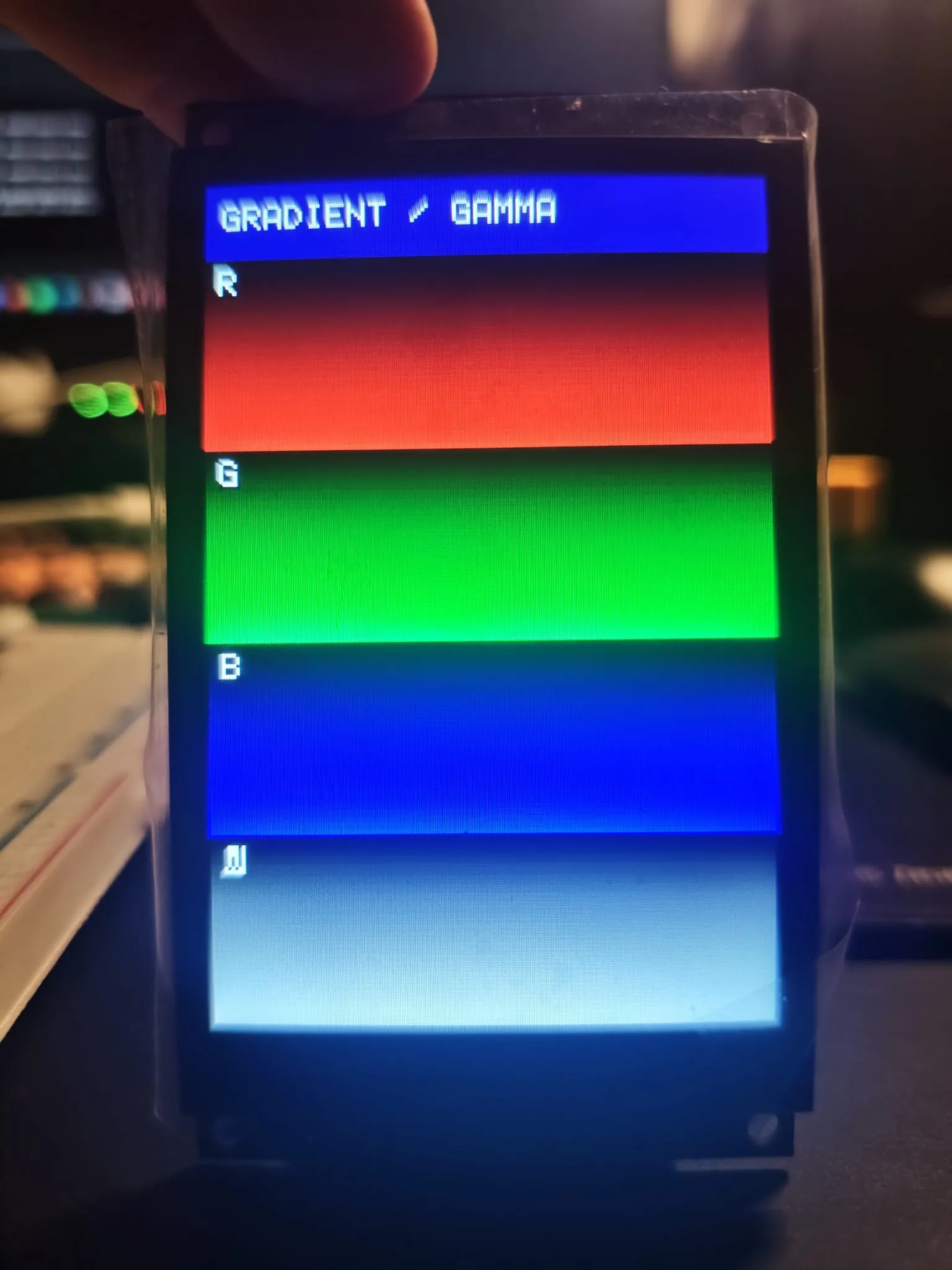
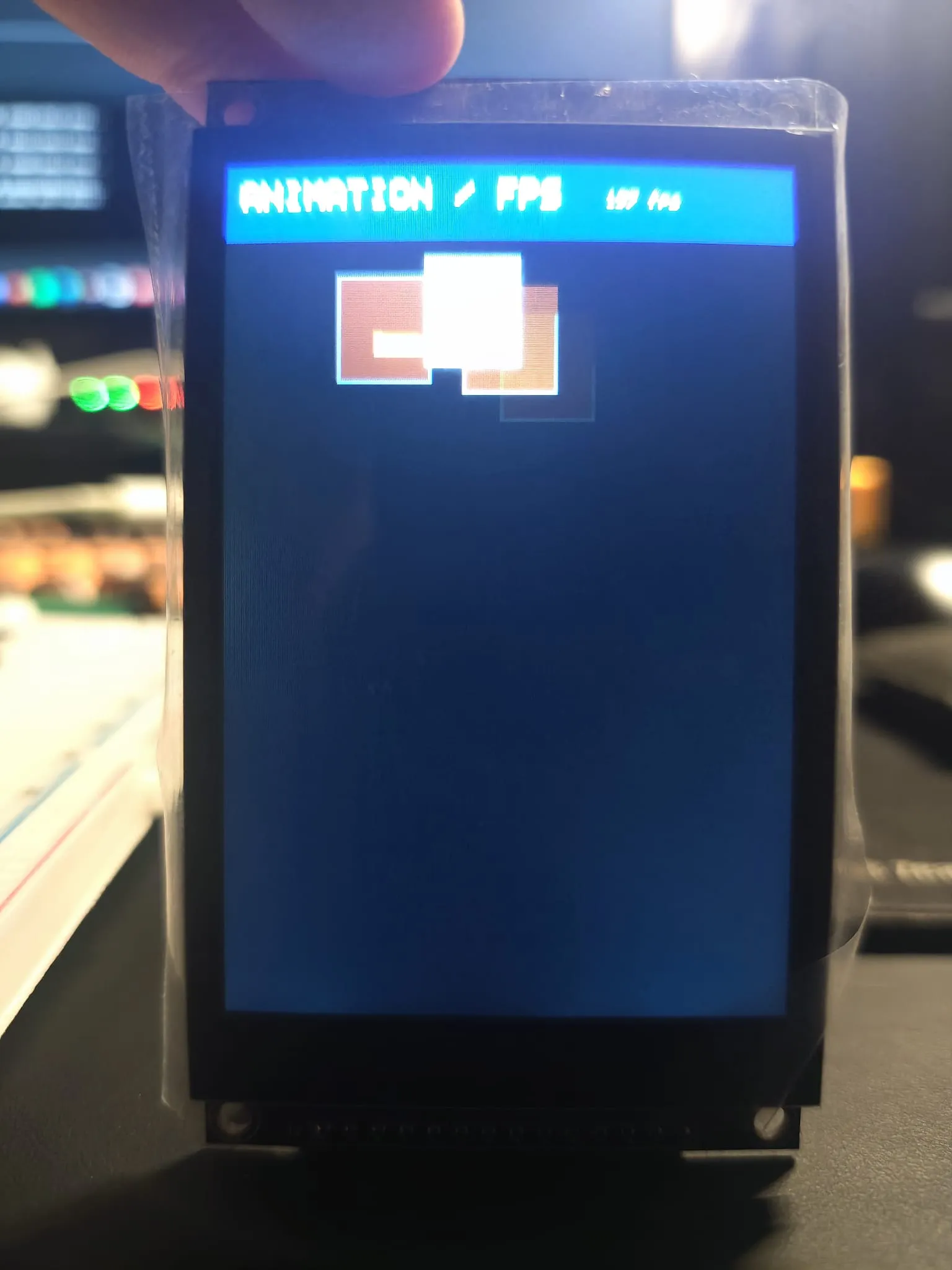
第一次上传就出画了。色条、gamma 渐变、硬件信息页、弹跳方块都正常。计数器显示 60fps 左右,但方块移动时能看到明显的残影。
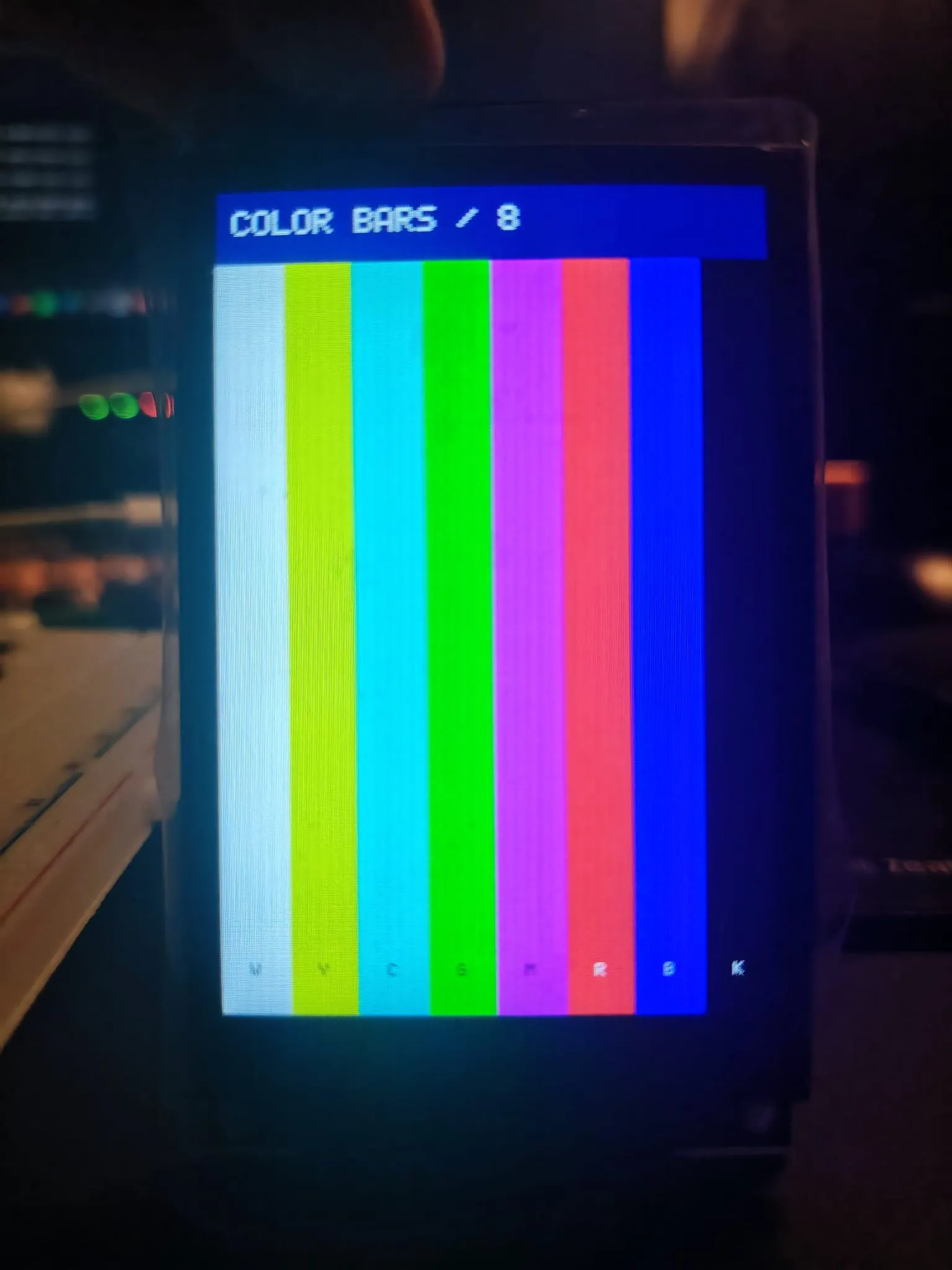
信息页打出来的数字:
- SPI 时钟:40MHz,模式 0。
- 整屏填充:307200 字节用了 71747 微秒,约 4.3MB/s。
- 触摸:FT6336U,I2C 地址 0x38。
- 屏 ID:
FF FF FF。
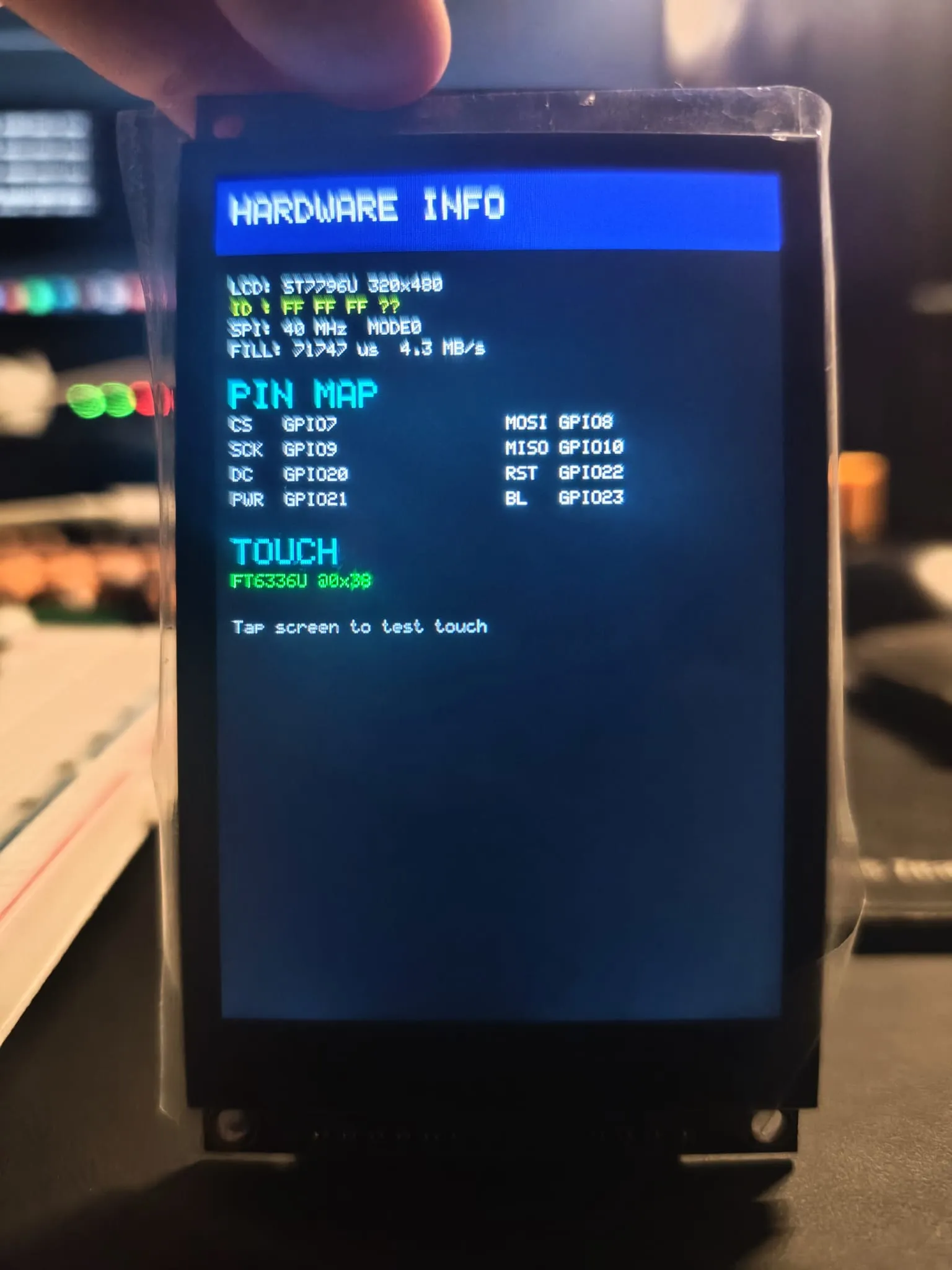
ID 读到 FF FF FF。ST7796 的 ID 从 SDO 回,这根线没接;它只用来识别。
这说明什么
40MHz 下整屏刷新 71.7ms,静态页面够用,视频不够。局部刷新便宜得多:弹跳方块每帧只重画两个小矩形,循环能跑到 60fps 左右。这个数字量的是程序循环,不是屏的响应速度;残影更像是面板本身的响应时间,这一点我没测。
触摸在 0x38 有应答,说明 I2C 这边也接对了。像素走 SPI,触摸走 I2C,第一次搭起来两边都通。