Doel
Ik bouw een project dat een snelle microcontroller met veel pinnen nodig heeft, dus koos ik de ESP32-P4.
Opstelling
- Bord: 慧勤智远 ESP32-P4 CB V3.2, ESP32-P4NRW32X, 32 MB PSRAM, 16 MB flash.
- Paneel: LCDWIKI MSP3526, 3,5 inch IPS, 320x480, ST7796, vierdraads SPI, FT6336U capacitieve touch.
- Toolchain: Arduino-ESP32 3.3.11, bord
ESP32P4 Dev Module, chipvariantv3.00 or newer, PSRAM aan. - Sketch: één .ino-bestand, geen libraries. De ST7796-initialisatie komt uit het bestand van de paneelfabrikant; tekst gebruikt een 5x7-bitmapfont.
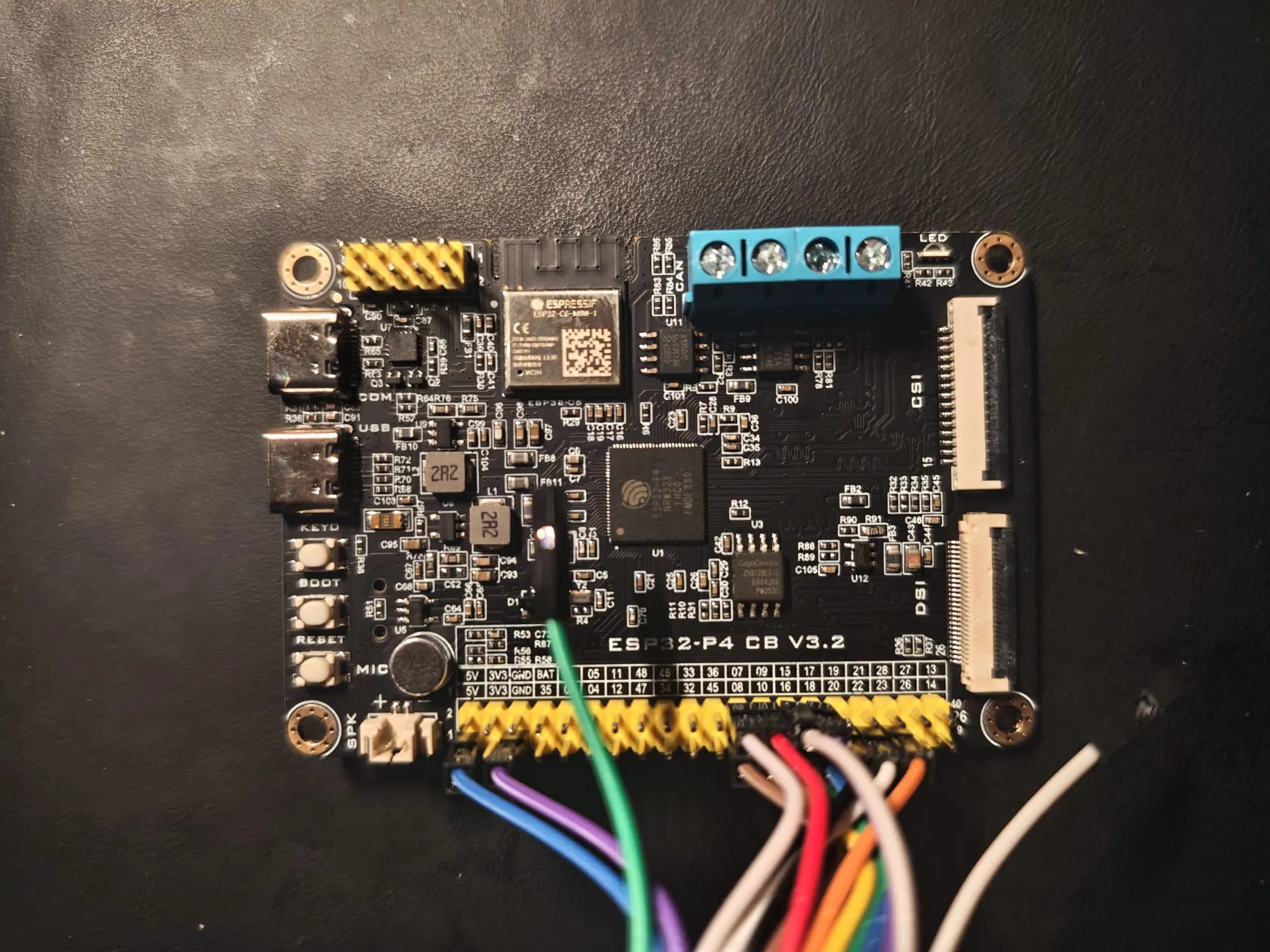
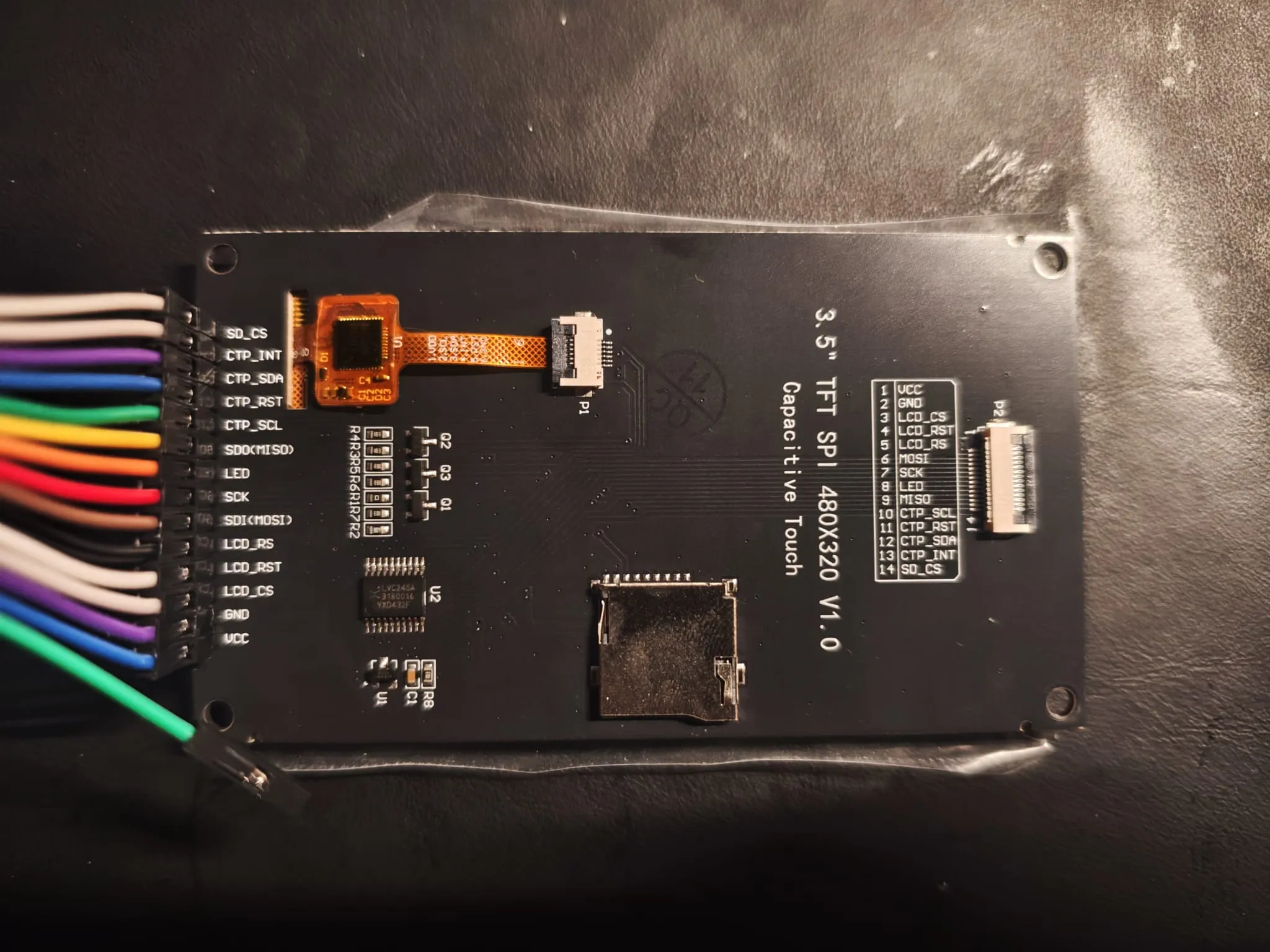
Het P4-bord heeft een 2x10 20-pins schermconnector voor een 2x10 stekker. Deze module is een enkele 14-pins rij, dus die ging met dupontdraden op de GPIO-header langs de onderrand. 5 V en GND komen van dezelfde header.
| Signaal | J2 | GPIO |
|---|---|---|
| LCD_CS | 3 | 7 |
| LCD_SDI | 6 | 8 |
| LCD_SCK | 7 | 9 |
| LCD_RST | 4 | 22 |
| LCD_SDO | 9 | 10 (optioneel) |
| CTP_INT | 13 | 15 |
| CTP_SCL | 10 | 16 |
| CTP_SDA | 12 | 17 |
| CTP_RST | 11 | 18 |
| LCD_RS | 5 | 20 |
| LED | 8 | 23 |
| VCC | 1 | 5 V |
| GND | 2 | GND |
Code
De volledige sketch staat hieronder. Eén .ino-bestand zonder libraries: pinconfiguratie, de ST7796-initialisatie van de fabrikant, lcdSetWindow(), de testschermen en de I2C-scan.
Open de volledige sketch (783 regels)
/*
 * ============================================================================
 *  ESP32-P4 CB V3.2  +  3.5" SPI 屏(ST7796U / 320x480)点屏自检程序
 * ----------------------------------------------------------------------------
 *  能点两种 3.5" 320x480 ST7796 屏,信号完全一样:
 *    ① WKS35HV031-WCT:20Pin 2.54 双排针,直接插 P4 板底部 "SPI 屏接口-20Pin"
 *    ② LCDWIKI MSP3525 / MSP3526:14Pin 2.54 单排(J2)或 14P 0.5mm FPC(P2),
 *       用杜邦线接到 P4 底部的 GPIO 排针(J2 与 P2 脚序相同,二选一)
 *
 *  依赖:只用 Arduino-ESP32 核心自带的 SPI / Wire / LEDC,不需要装任何第三方库。
 *       核心版本 >= 3.3.0(ESP32-P4 从 3.3.0 起进入 Arduino 官方支持)。
 *
 *  开发板设置(Arduino IDE):
 *    开发板        ESP32P4 Dev Module
 *    ChipVariant   v3.00 or newer      (这块板是 NRW32X / 400MHz,属于 v3)
 *    PSRAM         Enabled
 *    Flash Size    16MB
 *    USB Mode      Hardware CDC and JTAG 或默认均可(烧录走 CH343P 串口)
 *    端口          CH343P 对应的 COM 口
 *
 *  接线(J2 14Pin -> P4 GPIO 排针,按 GPIO 号接;括号里是 20Pin 屏座的脚号):
 *    LCD_CS  -> GPIO7  (5)     LCD_RST -> GPIO22 (9)
 *    LCD_SDI -> GPIO8  (6)     LCD_RS  -> GPIO20 (17)
 *    LCD_SCK -> GPIO9  (7)     LED     -> GPIO23 (18)
 *    LCD_SDO -> GPIO10 (10)    VCC 5V  -> 5V     (1/2)
 *    CTP_SCL -> GPIO16 (12)    GND     -> GND    (3/4/16/20)
 *    CTP_SDA -> GPIO17 (13)
 *    CTP_RST -> GPIO18 (14)
 *    CTP_INT -> GPIO15 (11)
 *
 *  串口:115200,8N1
 * ============================================================================
 */

#include <SPI.h>
#include <Wire.h>

// ============================== 可调参数 ====================================
#define LCD_SPI_HZ        40000000UL   // SPI 时钟。花屏/白屏先降到 20000000
#define LCD_ROTATION      0            // 开机方向 0=竖屏 320x480,1/3=横屏 480x320
#define BL_ACTIVE_HIGH    1            // 背光高电平点亮。屏幕亮但全黑时改成 0 试试
#define BL_DUTY_PERCENT   80           // 背光亮度 0~100
#define ENABLE_TOUCH      1            // 触摸自检(GT1151Q 或 FT6336U,I2C)
#define SERIAL_BAUD       115200

// ============================== 引脚定义 ====================================
// 全部来自 ESP32-P4 CB V3.2 原理图 Page3 的 SPI-20P 座子
static const int PIN_LCD_CS    = 7;    // SPI2_CS
static const int PIN_LCD_MOSI  = 8;    // SPI2_MOSI / LCD_SDI
static const int PIN_LCD_SCK   = 9;    // SPI2_SCK
static const int PIN_LCD_MISO  = 10;   // SPI2_MISO / LCD_SDO
static const int PIN_LCD_DC    = 20;   // LCD_DC
static const int PIN_LCD_RST   = 22;   // LCD_RST
static const int PIN_LCD_PWREN = 21;   // LCD_PWREN,高电平打开 SY6280,给屏供 5V
static const int PIN_LCD_BL    = 23;   // BL_CTR 背光

static const int PIN_TP_INT    = 15;   // CTP_INT
static const int PIN_TP_SCL    = 16;   // CTP_SCL
static const int PIN_TP_SDA    = 17;   // CTP_SDA
static const int PIN_TP_RST    = 18;   // CTP_RST

// ============================== 屏参 ========================================
static uint16_t lcdW = 320;
static uint16_t lcdH = 480;
static uint8_t  lcdMadctl = 0x48;
static uint8_t  lcdId[3] = {0, 0, 0};
static bool     lcdIdOk = false;

// ============================== 颜色 ========================================
#define RGB565(r, g, b) ((uint16_t)((((r) & 0xF8) << 8) | (((g) & 0xFC) << 3) | ((b) >> 3)))
static const uint16_t C_BLACK   = 0x0000;
static const uint16_t C_WHITE   = 0xFFFF;
static const uint16_t C_RED     = 0xF800;
static const uint16_t C_GREEN   = 0x07E0;
static const uint16_t C_BLUE    = 0x001F;
static const uint16_t C_YELLOW  = 0xFFE0;
static const uint16_t C_CYAN    = 0x07FF;
static const uint16_t C_MAGENTA = 0xF81F;
static const uint16_t C_ORANGE  = 0xFD20;
static const uint16_t C_GRAY    = 0x8410;
static const uint16_t C_DARK    = 0x18E3;   // 深灰,当背景
static const uint16_t C_NAVY    = 0x0010;

// ============================== 5x7 ASCII 字库 ==============================
// 经典 5x7 点阵,每字符 5 列,每列 1 字节,bit0 在最上面
static const uint8_t FONT5X7[95][5] = {
  {0x00,0x00,0x00,0x00,0x00}, // ' '
  {0x00,0x00,0x5F,0x00,0x00}, // '!'
  {0x00,0x07,0x00,0x07,0x00}, // '"'
  {0x14,0x7F,0x14,0x7F,0x14}, // '#'
  {0x24,0x2A,0x7F,0x2A,0x12}, // '$'
  {0x23,0x13,0x08,0x64,0x62}, // '%'
  {0x36,0x49,0x56,0x20,0x50}, // '&'
  {0x00,0x08,0x07,0x03,0x00}, // '''
  {0x00,0x1C,0x22,0x41,0x00}, // '('
  {0x00,0x41,0x22,0x1C,0x00}, // ')'
  {0x2A,0x1C,0x7F,0x1C,0x2A}, // '*'
  {0x08,0x08,0x3E,0x08,0x08}, // '+'
  {0x00,0x80,0x70,0x30,0x00}, // ','
  {0x08,0x08,0x08,0x08,0x08}, // '-'
  {0x00,0x00,0x60,0x60,0x00}, // '.'
  {0x20,0x10,0x08,0x04,0x02}, // '/'
  {0x3E,0x51,0x49,0x45,0x3E}, // '0'
  {0x00,0x42,0x7F,0x40,0x00}, // '1'
  {0x72,0x49,0x49,0x49,0x46}, // '2'
  {0x21,0x41,0x49,0x4D,0x33}, // '3'
  {0x18,0x14,0x12,0x7F,0x10}, // '4'
  {0x27,0x45,0x45,0x45,0x39}, // '5'
  {0x3C,0x4A,0x49,0x49,0x31}, // '6'
  {0x41,0x21,0x11,0x09,0x07}, // '7'
  {0x36,0x49,0x49,0x49,0x36}, // '8'
  {0x46,0x49,0x49,0x29,0x1E}, // '9'
  {0x00,0x36,0x36,0x00,0x00}, // ':'
  {0x00,0x56,0x36,0x00,0x00}, // ';'
  {0x08,0x14,0x22,0x41,0x00}, // '<'
  {0x14,0x14,0x14,0x14,0x14}, // '='
  {0x00,0x41,0x22,0x14,0x08}, // '>'
  {0x02,0x01,0x51,0x09,0x06}, // '?'
  {0x32,0x49,0x79,0x41,0x3E}, // '@'
  {0x7E,0x11,0x11,0x11,0x7E}, // 'A'
  {0x7F,0x49,0x49,0x49,0x36}, // 'B'
  {0x3E,0x41,0x41,0x41,0x22}, // 'C'
  {0x7F,0x41,0x41,0x22,0x1C}, // 'D'
  {0x7F,0x49,0x49,0x49,0x41}, // 'E'
  {0x7F,0x09,0x09,0x09,0x01}, // 'F'
  {0x3E,0x41,0x49,0x49,0x7A}, // 'G'
  {0x7F,0x08,0x08,0x08,0x7F}, // 'H'
  {0x00,0x41,0x7F,0x41,0x00}, // 'I'
  {0x20,0x40,0x41,0x3F,0x01}, // 'J'
  {0x7F,0x08,0x14,0x22,0x41}, // 'K'
  {0x7F,0x40,0x40,0x40,0x40}, // 'L'
  {0x7F,0x02,0x0C,0x02,0x7F}, // 'M'
  {0x7F,0x04,0x08,0x10,0x7F}, // 'N'
  {0x3E,0x41,0x41,0x41,0x3E}, // 'O'
  {0x7F,0x09,0x09,0x09,0x06}, // 'P'
  {0x3E,0x41,0x51,0x21,0x5E}, // 'Q'
  {0x7F,0x09,0x19,0x29,0x46}, // 'R'
  {0x46,0x49,0x49,0x49,0x31}, // 'S'
  {0x01,0x01,0x7F,0x01,0x01}, // 'T'
  {0x3F,0x40,0x40,0x40,0x3F}, // 'U'
  {0x1F,0x20,0x40,0x20,0x1F}, // 'V'
  {0x3F,0x40,0x38,0x40,0x3F}, // 'W'
  {0x63,0x14,0x08,0x14,0x63}, // 'X'
  {0x07,0x08,0x70,0x08,0x07}, // 'Y'
  {0x61,0x51,0x49,0x45,0x43}, // 'Z'
  {0x00,0x7F,0x41,0x41,0x00}, // '['
  {0x02,0x04,0x08,0x10,0x20}, // '\'
  {0x00,0x41,0x41,0x7F,0x00}, // ']'
  {0x04,0x02,0x01,0x02,0x04}, // '^'
  {0x40,0x40,0x40,0x40,0x40}, // '_'
  {0x00,0x01,0x02,0x04,0x00}, // '`'
  {0x20,0x54,0x54,0x54,0x78}, // 'a'
  {0x7F,0x48,0x44,0x44,0x38}, // 'b'
  {0x38,0x44,0x44,0x44,0x20}, // 'c'
  {0x38,0x44,0x44,0x48,0x7F}, // 'd'
  {0x38,0x54,0x54,0x54,0x18}, // 'e'
  {0x08,0x7E,0x09,0x01,0x02}, // 'f'
  {0x0C,0x52,0x52,0x52,0x3E}, // 'g'
  {0x7F,0x08,0x04,0x04,0x78}, // 'h'
  {0x00,0x44,0x7D,0x40,0x00}, // 'i'
  {0x20,0x40,0x44,0x3D,0x00}, // 'j'
  {0x7F,0x10,0x28,0x44,0x00}, // 'k'
  {0x00,0x41,0x7F,0x40,0x00}, // 'l'
  {0x7C,0x04,0x18,0x04,0x78}, // 'm'
  {0x7C,0x08,0x04,0x04,0x78}, // 'n'
  {0x38,0x44,0x44,0x44,0x38}, // 'o'
  {0x7C,0x14,0x14,0x14,0x08}, // 'p'
  {0x08,0x14,0x14,0x18,0x7C}, // 'q'
  {0x7C,0x08,0x04,0x04,0x08}, // 'r'
  {0x48,0x54,0x54,0x54,0x20}, // 's'
  {0x04,0x3F,0x44,0x40,0x20}, // 't'
  {0x3C,0x40,0x40,0x20,0x7C}, // 'u'
  {0x1C,0x20,0x40,0x20,0x1C}, // 'v'
  {0x3C,0x40,0x30,0x40,0x3C}, // 'w'
  {0x44,0x28,0x10,0x28,0x44}, // 'x'
  {0x0C,0x50,0x50,0x50,0x3C}, // 'y'
  {0x44,0x64,0x54,0x4C,0x44}, // 'z'
  {0x00,0x08,0x36,0x41,0x00}, // '{'
  {0x00,0x00,0x7F,0x00,0x00}, // '|'
  {0x00,0x41,0x36,0x08,0x00}, // '}'
  {0x10,0x08,0x08,0x10,0x08}, // '~'
};

// ============================== 底层 SPI 封装 ===============================
static uint8_t txBuf[4096];              // 送显缓冲,按块转换字节序
static uint16_t charBuf[6 * 4 * 8 * 4];  // 单字符最大 scale=4 的像素缓存(768 像素)

static inline void lcdSelect()   { digitalWrite(PIN_LCD_CS, LOW);  }
static inline void lcdDeselect() { digitalWrite(PIN_LCD_CS, HIGH); }
static inline void lcdCmdMode()  { digitalWrite(PIN_LCD_DC, LOW);  }
static inline void lcdDataMode() { digitalWrite(PIN_LCD_DC, HIGH); }

static void lcdCmd(uint8_t cmd) {
  lcdSelect();
  lcdCmdMode();
  SPI.transfer(cmd);
  lcdDeselect();
}

static void lcdData(const uint8_t *d, size_t n) {
  if (!n) return;
  lcdSelect();
  lcdDataMode();
  SPI.writeBytes(d, n);
  lcdDeselect();
}

static void lcdData8(uint8_t d) { lcdData(&d, 1); }

// ST7796 初始化(完全照抄厂家 ST7796U+3.5IPS-2.2gamma 序列,别随手改)
static void lcdInitPanel() {
  // 硬复位
  digitalWrite(PIN_LCD_RST, LOW);
  delay(20);
  digitalWrite(PIN_LCD_RST, HIGH);
  delay(120);

  const uint8_t d1[]  = {0x48};                                  // MADCTL: MX + BGR
  const uint8_t d3a[] = {0x55};                                  // 16bit RGB565
  const uint8_t f0c3[] = {0xC3};
  const uint8_t f096[] = {0x96};
  const uint8_t b4[]  = {0x01};
  const uint8_t b7[]  = {0xC6};
  const uint8_t b9[]  = {0x02, 0xE0};
  const uint8_t c0[]  = {0x80, 0x16};
  const uint8_t c1[]  = {0x19};
  const uint8_t c2[]  = {0xA7};
  const uint8_t c5[]  = {0x16};
  const uint8_t e8[]  = {0x40, 0x8A, 0x00, 0x00, 0x29, 0x19, 0xA5, 0x33};
  const uint8_t ep[]  = {0xF0, 0x07, 0x0D, 0x04, 0x05, 0x14, 0x36, 0x54,
                         0x4C, 0x38, 0x13, 0x14, 0x2E, 0x34};      // 正极性 gamma
  const uint8_t en[]  = {0xF0, 0x10, 0x14, 0x0E, 0x0C, 0x08, 0x35, 0x44,
                         0x4C, 0x26, 0x10, 0x12, 0x2C, 0x32};      // 负极性 gamma
  const uint8_t f03c[] = {0x3C};
  const uint8_t f069[] = {0x69};

  lcdCmd(0x11);  delay(120);          // Sleep out
  lcdCmd(0x36);  lcdData(d1, sizeof(d1));
  lcdCmd(0x3A);  lcdData(d3a, sizeof(d3a));
  lcdCmd(0xF0);  lcdData(f0c3, sizeof(f0c3));
  lcdCmd(0xF0);  lcdData(f096, sizeof(f096));
  lcdCmd(0xB4);  lcdData(b4, sizeof(b4));
  lcdCmd(0xB7);  lcdData(b7, sizeof(b7));
  lcdCmd(0xB9);  lcdData(b9, sizeof(b9));
  lcdCmd(0xC0);  lcdData(c0, sizeof(c0));
  lcdCmd(0xC1);  lcdData(c1, sizeof(c1));
  lcdCmd(0xC2);  lcdData(c2, sizeof(c2));
  lcdCmd(0xC5);  lcdData(c5, sizeof(c5));
  lcdCmd(0xE8);  lcdData(e8, sizeof(e8));
  lcdCmd(0xE0);  lcdData(ep, sizeof(ep));
  lcdCmd(0xE1);  lcdData(en, sizeof(en));
  lcdCmd(0xF0);  lcdData(f03c, sizeof(f03c));
  lcdCmd(0xF0);  lcdData(f069, sizeof(f069));
  delay(120);
  lcdCmd(0x21);                        // 反显,这块 IPS 必须开
  lcdCmd(0x29);                        // Display on
  delay(20);
}

// 读 ID(0x04 RDDID,返回 3 字节,正常应看到 0x00 0x77 0x96)
static void lcdReadId() {
  lcdSelect();
  lcdCmdMode();
  SPI.transfer(0x04);
  lcdDataMode();
  SPI.transfer(0x00);                  // dummy
  for (int i = 0; i < 3; i++) lcdId[i] = SPI.transfer(0x00);
  lcdDeselect();
  lcdIdOk = (lcdId[0] == 0x00 && lcdId[1] == 0x77 && lcdId[2] == 0x96);
}

// 设置显示窗口
static void lcdSetWindow(uint16_t x0, uint16_t y0, uint16_t x1, uint16_t y1) {
  uint8_t b[4];
  lcdCmd(0x2A);
  b[0] = x0 >> 8; b[1] = x0 & 0xFF; b[2] = x1 >> 8; b[3] = x1 & 0xFF;
  lcdData(b, 4);
  lcdCmd(0x2B);
  b[0] = y0 >> 8; b[1] = y0 & 0xFF; b[2] = y1 >> 8; b[3] = y1 & 0xFF;
  lcdData(b, 4);
  lcdCmd(0x2C);                        // RAMWR,后面直接灌像素
}

// 把 uint16_t 像素数组(逻辑颜色)按大端灌进窗口
static void lcdPushPixels(uint16_t x, uint16_t y, uint16_t w, uint16_t h, const uint16_t *px) {
  if (w == 0 || h == 0) return;
  lcdSetWindow(x, y, x + w - 1, y + h - 1);
  lcdSelect();
  lcdDataMode();
  uint32_t total = (uint32_t)w * h;     // 像素数
  uint32_t done = 0;
  while (done < total) {
    uint32_t n = total - done;
    if (n > sizeof(txBuf) / 2) n = sizeof(txBuf) / 2;
    for (uint32_t i = 0; i < n; i++) {
      uint16_t c = px[done + i];
      txBuf[i * 2]     = c >> 8;
      txBuf[i * 2 + 1] = c & 0xFF;
    }
    SPI.writeBytes(txBuf, n * 2);
    done += n;
  }
  lcdDeselect();
}

// 整屏填充
static void lcdFill(uint16_t color) {
  lcdSetWindow(0, 0, lcdW - 1, lcdH - 1);
  lcdSelect();
  lcdDataMode();
  for (uint32_t i = 0; i < sizeof(txBuf); i += 2) {
    txBuf[i]     = color >> 8;
    txBuf[i + 1] = color & 0xFF;
  }
  uint32_t total = (uint32_t)lcdW * lcdH * 2;
  while (total) {
    uint32_t n = total > sizeof(txBuf) ? sizeof(txBuf) : total;
    SPI.writeBytes(txBuf, n);
    total -= n;
  }
  lcdDeselect();
}

// 矩形填充(单色)
static void lcdFillRect(uint16_t x, uint16_t y, uint16_t w, uint16_t h, uint16_t color) {
  if (w == 0 || h == 0) return;
  if (x >= lcdW || y >= lcdH) return;
  if (x + w > lcdW) w = lcdW - x;
  if (y + h > lcdH) h = lcdH - y;
  lcdSetWindow(x, y, x + w - 1, y + h - 1);
  lcdSelect();
  lcdDataMode();
  for (uint32_t i = 0; i < sizeof(txBuf); i += 2) {
    txBuf[i]     = color >> 8;
    txBuf[i + 1] = color & 0xFF;
  }
  uint32_t total = (uint32_t)w * h * 2;
  while (total) {
    uint32_t n = total > sizeof(txBuf) ? sizeof(txBuf) : total;
    SPI.writeBytes(txBuf, n);
    total -= n;
  }
  lcdDeselect();
}

static void lcdRect(uint16_t x, uint16_t y, uint16_t w, uint16_t h, uint16_t color) {
  lcdFillRect(x, y, w, 2, color);
  lcdFillRect(x, y + h - 2, w, 2, color);
  lcdFillRect(x, y, 2, h, color);
  lcdFillRect(x + w - 2, y, 2, h, color);
}

// 旋转:0/2 竖屏 320x480,1/3 横屏 480x320
static void lcdSetRotation(uint8_t r) {
  static const uint8_t mad[4] = {0x48, 0x28, 0x88, 0xE8};
  lcdMadctl = mad[r & 3];
  lcdCmd(0x36);
  lcdData8(lcdMadctl);
  if (r & 1) { lcdW = 480; lcdH = 320; }
  else       { lcdW = 320; lcdH = 480; }
}

// ============================== 文字绘制 ====================================
// 每个字符按 scale 放大后整块推送,比逐像素画快很多
static void lcdDrawChar(int16_t x, int16_t y, char ch, uint16_t fg, uint16_t bg, uint8_t scale) {
  if (scale < 1) scale = 1;
  if (scale > 4) scale = 4;
  if (ch < 0x20 || ch > 0x7E) ch = '?';
  const uint8_t *g = FONT5X7[(uint8_t)ch - 0x20];

  uint16_t cw = 6 * scale;
  uint16_t chh = 8 * scale;
  uint16_t *buf = charBuf;
  for (uint16_t py = 0; py < chh; py++) {
    uint8_t row = py / scale;
    for (uint16_t pxs = 0; pxs < cw; pxs++) {
      uint8_t col = pxs / scale;
      bool on = (col < 5 && row < 7) ? ((g[col] >> row) & 1) : false;
      buf[py * cw + pxs] = on ? fg : bg;
    }
  }
  lcdPushPixels(x, y, cw, chh, buf);
}

static void lcdDrawText(int16_t x, int16_t y, const char *s, uint16_t fg, uint16_t bg, uint8_t scale) {
  int16_t cx = x;
  while (*s) {
    if (cx + 6 * scale > lcdW) break;
    lcdDrawChar(cx, y, *s++, fg, bg, scale);
    cx += 6 * scale;
  }
}

// 居中版:按估算宽度算起点
static void lcdDrawTextCentered(int16_t y, const char *s, uint16_t fg, uint16_t bg, uint8_t scale) {
  int len = strlen(s);
  int16_t w = len * 6 * scale;
  lcdDrawText((lcdW - w) / 2, y, s, fg, bg, scale);
}

// ==================== 触摸(GT1151Q / FT6336U 双支持) ======================
// WKS35HV031-WCT  : GT1151Q,I2C 0x14 或 0x5D,16 位寄存器
// LCDWIKI MSP3526 : FT6336U,I2C 0x38,8 位寄存器
enum { TP_NONE = 0, TP_GT9XX, TP_FT6X36 };
static uint8_t tpAddr = 0;
static uint8_t tpType = TP_NONE;
static bool    tpReady = false;

// GT9xx:先写 16 位寄存器地址,再读
static bool gtRead(uint16_t reg, uint8_t *buf, uint8_t n) {
  if (!tpReady) return false;
  Wire.beginTransmission(tpAddr);
  Wire.write((uint8_t)(reg >> 8));
  Wire.write((uint8_t)(reg & 0xFF));
  if (Wire.endTransmission(false) != 0) return false;
  if (Wire.requestFrom((int)tpAddr, (int)n) != n) return false;
  for (uint8_t i = 0; i < n; i++) buf[i] = Wire.read();
  return true;
}

static bool gtWrite8(uint16_t reg, uint8_t v) {
  if (!tpReady) return false;
  Wire.beginTransmission(tpAddr);
  Wire.write((uint8_t)(reg >> 8));
  Wire.write((uint8_t)(reg & 0xFF));
  Wire.write(v);
  return Wire.endTransmission() == 0;
}

// FT6x36:8 位寄存器地址
static bool ftRead(uint8_t reg, uint8_t *buf, uint8_t n) {
  if (!tpReady) return false;
  Wire.beginTransmission(tpAddr);
  Wire.write(reg);
  if (Wire.endTransmission(false) != 0) return false;
  if (Wire.requestFrom((int)tpAddr, (int)n) != n) return false;
  for (uint8_t i = 0; i < n; i++) buf[i] = Wire.read();
  return true;
}

static void touchInit() {
#if ENABLE_TOUCH
  pinMode(PIN_TP_INT, INPUT_PULLUP);
  pinMode(PIN_TP_RST, OUTPUT);
  digitalWrite(PIN_TP_RST, LOW);
  delay(10);
  digitalWrite(PIN_TP_RST, HIGH);
  delay(60);

  Wire.begin(PIN_TP_SDA, PIN_TP_SCL, 400000);
  Wire.setTimeOut(20);

  Serial.println("[TP ] I2C 扫描:");
  for (uint8_t a = 0x08; a < 0x78; a++) {
    Wire.beginTransmission(a);
    if (Wire.endTransmission() == 0) {
      Serial.printf("      发现 0x%02X
", a);
      if (a == 0x38) {                       // FT6336U
        tpAddr = a; tpType = TP_FT6X36;
      } else if ((a == 0x14 || a == 0x5D) && tpType != TP_FT6X36) {
        tpAddr = a; tpType = TP_GT9XX;       // GT1151Q / GT911
      }
    }
  }

  if (tpType == TP_NONE) {
    Serial.println("[TP ] 没扫到触摸芯片,跳过触摸测试");
    return;
  }
  tpReady = true;

  if (tpType == TP_GT9XX) {
    uint8_t pid[4] = {0};
    if (gtRead(0x8140, pid, 4)) {
      Serial.printf("[TP ] GT9xx @0x%02X, Product ID = \"%c%c%c%c\"
",
                    tpAddr, pid[0], pid[1], pid[2], pid[3]);
    } else {
      Serial.printf("[TP ] GT9xx @0x%02X
", tpAddr);
    }
  } else {
    uint8_t chip[2] = {0};
    ftRead(0xA3, chip, 2);                   // FT 的芯片 ID,读不到也不影响
    Serial.printf("[TP ] FT6336U @0x%02X (chip id %02X %02X)
", tpAddr, chip[0], chip[1]);
  }
#endif
}

// 读一个触摸点,成功返回 true
static bool touchPoll(uint16_t &tx, uint16_t &ty) {
  if (!tpReady) return false;

  if (tpType == TP_FT6X36) {
    // 0x02: 触点数;0x03..0x06: 第 1 点 X/Y(高 4 位在 XH/YH 的低半字节)
    uint8_t b[5] = {0};
    if (!ftRead(0x02, b, 5)) return false;
    if ((b[0] & 0x0F) == 0) return false;
    tx = ((b[1] & 0x0F) << 8) | b[2];
    ty = ((b[3] & 0x0F) << 8) | b[4];
    return true;
  }

  // GT9xx
  uint8_t st = 0;
  if (!gtRead(0x814E, &st, 1)) return false;
  if (!(st & 0x80)) return false;
  bool hasPoint = (st & 0x0F) > 0;
  bool got = false;
  if (hasPoint) {
    uint8_t p[6];
    if (gtRead(0x8150, p, 6)) {
      tx = p[0] | (p[1] << 8);
      ty = p[2] | (p[3] << 8);
      got = true;
    }
  }
  gtWrite8(0x814E, 0);                 // 清状态,否则不会上报新点
  return got;
}

// ============================== 背光 ========================================
static void backlightSet(uint8_t percent) {
  if (percent > 100) percent = 100;
  uint32_t duty = (1023UL * percent) / 100;
#if BL_ACTIVE_HIGH
  ledcWrite(PIN_LCD_BL, duty);
#else
  ledcWrite(PIN_LCD_BL, 1023 - duty);
#endif
}

// ============================== 测试画面 ====================================
static uint32_t benchUs = 0;

static void drawHeader(const char *title) {
  lcdFillRect(0, 0, lcdW, 44, C_NAVY);
  lcdDrawText(10, 12, title, C_WHITE, C_NAVY, 2);
}

static void screenBoot() {
  lcdFill(C_WHITE);  delay(120);
  lcdFill(C_BLACK);  delay(80);
  lcdFill(C_RED);    delay(120);
  lcdFill(C_GREEN);  delay(120);
  lcdFill(C_BLUE);   delay(120);
  lcdFill(C_BLACK);

  lcdDrawTextCentered(lcdH / 2 - 90, "ESP32-P4", C_CYAN, C_BLACK, 4);
  lcdDrawTextCentered(lcdH / 2 - 10, "ST7796 SPI LCD", C_WHITE, C_BLACK, 2);
  lcdDrawTextCentered(lcdH / 2 + 20, "320 x 480  16bit", C_YELLOW, C_BLACK, 2);
  lcdDrawTextCentered(lcdH / 2 + 70, "SPI OK", C_GREEN, C_BLACK, 3);
  delay(1500);
}

static void screenInfo() {
  lcdFill(C_BLACK);
  drawHeader("HARDWARE INFO");

  int y = 60;
  char line[48];

  lcdDrawText(10, y, "LCD: ST7796U 320x480", C_WHITE, C_BLACK, 1); y += 12;
  snprintf(line, sizeof(line), "ID : %02X %02X %02X %s", lcdId[0], lcdId[1], lcdId[2],
           lcdIdOk ? "OK" : "??");
  lcdDrawText(10, y, line, lcdIdOk ? C_GREEN : C_YELLOW, C_BLACK, 1); y += 12;
  snprintf(line, sizeof(line), "SPI: %lu MHz  MODE0", (unsigned long)(LCD_SPI_HZ / 1000000));
  lcdDrawText(10, y, line, C_WHITE, C_BLACK, 1); y += 12;
  snprintf(line, sizeof(line), "FILL: %lu us  %.1f MB/s", (unsigned long)benchUs,
           benchUs ? (lcdW * lcdH * 2.0f / benchUs) : 0.0f);   // 1 us -> MB/s 换算
  lcdDrawText(10, y, line, C_WHITE, C_BLACK, 1); y += 22;

  lcdDrawText(10, y, "PIN MAP", C_CYAN, C_BLACK, 2); y += 20;
  const struct { const char *n; int p; } pins[] = {
    {"CS  ", PIN_LCD_CS},  {"MOSI", PIN_LCD_MOSI}, {"SCK ", PIN_LCD_SCK}, {"MISO", PIN_LCD_MISO},
    {"DC  ", PIN_LCD_DC},  {"RST ", PIN_LCD_RST},  {"PWR ", PIN_LCD_PWREN}, {"BL  ", PIN_LCD_BL},
  };
  for (uint8_t i = 0; i < sizeof(pins) / sizeof(pins[0]); i++) {
    snprintf(line, sizeof(line), "%s GPIO%d", pins[i].n, pins[i].p);
    lcdDrawText(10 + (i % 2) * 155, y, line, C_WHITE, C_BLACK, 1);
    if (i % 2) y += 14;
  }
  y += 12;
  lcdDrawText(10, y, "TOUCH", C_CYAN, C_BLACK, 2); y += 20;
  if (tpType == TP_GT9XX) {
    snprintf(line, sizeof(line), "GT1151Q @0x%02X", tpAddr);
    lcdDrawText(10, y, line, C_GREEN, C_BLACK, 1);
  } else if (tpType == TP_FT6X36) {
    snprintf(line, sizeof(line), "FT6336U @0x%02X", tpAddr);
    lcdDrawText(10, y, line, C_GREEN, C_BLACK, 1);
  } else {
    lcdDrawText(10, y, "not found (optional)", C_GRAY, C_BLACK, 1);
  }
  y += 26;
  lcdDrawText(10, y, "Tap screen to test touch", C_GRAY, C_BLACK, 1);
  delay(2500);
}

static void screenColorBars() {
  lcdFill(C_BLACK);
  drawHeader("COLOR BARS / 8");
  const uint16_t cols[8] = {C_WHITE, C_YELLOW, C_CYAN, C_GREEN,
                            C_MAGENTA, C_RED, C_BLUE, C_BLACK};
  const char *names[8] = {"W", "Y", "C", "G", "M", "R", "B", "K"};
  uint16_t bw = lcdW / 8;
  for (int i = 0; i < 8; i++) {
    lcdFillRect(i * bw, 44, bw, lcdH - 44, cols[i]);
    bool dark = (cols[i] == C_BLACK || cols[i] == C_BLUE || cols[i] == C_RED);
    lcdDrawText(i * bw + bw / 2 - 3, lcdH - 30, names[i],
                dark ? C_WHITE : C_BLACK, cols[i], 1);
  }
  delay(2000);
}

static void screenGradient() {
  lcdFill(C_BLACK);
  drawHeader("GRADIENT / GAMMA");
  uint16_t y0 = 44;
  uint16_t bandH = (lcdH - 44) / 4;
  for (uint16_t y = 0; y < bandH; y++) {
    uint8_t v = (uint8_t)(255UL * y / (bandH - 1));
    lcdFillRect(0, y0 + y, lcdW, 1, RGB565(v, 0, 0));
    lcdFillRect(0, y0 + bandH + y, lcdW, 1, RGB565(0, v, 0));
    lcdFillRect(0, y0 + bandH * 2 + y, lcdW, 1, RGB565(0, 0, v));
    lcdFillRect(0, y0 + bandH * 3 + y, lcdW, 1, RGB565(v, v, v));
  }
  lcdDrawText(8, y0 + 6, "R", C_WHITE, C_BLACK, 2);
  lcdDrawText(8, y0 + bandH + 6, "G", C_WHITE, C_BLACK, 2);
  lcdDrawText(8, y0 + bandH * 2 + 6, "B", C_WHITE, C_BLACK, 2);
  lcdDrawText(8, y0 + bandH * 3 + 6, "W", C_BLACK, C_WHITE, 2);
  delay(2500);
}

static void screenRotation() {
  for (uint8_t r = 0; r < 4; r++) {
    lcdSetRotation(r);
    lcdFill(C_BLACK);
    char line[24];
    snprintf(line, sizeof(line), "ROTATION %d", r);
    lcdDrawTextCentered(lcdH / 2 - 40, line, C_CYAN, C_BLACK, 3);
    snprintf(line, sizeof(line), "%d x %d", lcdW, lcdH);
    lcdDrawTextCentered(lcdH / 2 + 10, line, C_WHITE, C_BLACK, 2);
    lcdRect(4, 4, lcdW - 8, lcdH - 8, C_GREEN);
    // 左上角标记,用来判断方向是否和预期一致
    lcdFillRect(4, 4, 40, 40, C_RED);
    lcdDrawText(10, 12, "TL", C_WHITE, C_RED, 2);
    delay(1100);
  }
  lcdSetRotation(LCD_ROTATION);
}

static void screenAnimate() {
  lcdSetRotation(LCD_ROTATION);
  lcdFill(C_BLACK);
  drawHeader("ANIMATION / FPS");

  const uint16_t boxW = lcdW / 6;
  const uint16_t boxH = lcdH / 8;
  int16_t bx = 10, by = 80;
  int16_t vx = 7, vy = 5;
  uint32_t frames = 0, t0 = millis();
  uint16_t tx = 0, ty = 0;
  uint16_t lastTx = 0, lastTy = 0;
  bool touchDown = false;

  while (millis() - t0 < 4000) {
    lcdFillRect(bx, by, boxW, boxH, C_BLACK);     // 擦掉上一帧
    bx += vx; by += vy;
    if (bx <= 0) { bx = 0; vx = -vx; }
    if (bx + boxW >= lcdW) { bx = lcdW - boxW; vx = -vx; }
    if (by <= 44) { by = 44; vy = -vy; }
    if (by + boxH >= lcdH) { by = lcdH - boxH; vy = -vy; }
    lcdFillRect(bx, by, boxW, boxH, C_ORANGE);
    lcdRect(bx, by, boxW, boxH, C_WHITE);

    // 触摸点:屏幕上画一个小圆点
    if (touchPoll(tx, ty)) {
      if (!touchDown || abs((int)tx - (int)lastTx) > 2 || abs((int)ty - (int)lastTy) > 2) {
        lcdFillRect(lastTx - 6, lastTy - 6, 12, 12, C_BLACK);
        lcdFillRect(lastTx - 3, lastTy - 3, 6, 6, C_WHITE);
        lastTx = tx; lastTy = ty; touchDown = true;
      }
      lcdFillRect(tx - 8, ty - 8, 16, 16, C_CYAN);
      lcdFillRect(tx - 5, ty - 5, 10, 10, C_RED);
    }

    frames++;
    if ((frames & 15) == 0) {
      uint32_t dt = millis() - t0;
      if (dt > 0) {
        char fps[16];
        snprintf(fps, sizeof(fps), "%lu fps", (unsigned long)(frames * 1000UL / dt));
        lcdFillRect(lcdW - 110, 12, 100, 20, C_NAVY);
        lcdDrawText(lcdW - 106, 18, fps, C_YELLOW, C_NAVY, 1);
      }
    }
    delay(1);
    yield();
  }
  Serial.printf("[ANIM] 4 秒 %lu 帧
", (unsigned long)frames);
}

// ============================== setup / loop ================================
void setup() {
  Serial.begin(SERIAL_BAUD);
  delay(400);
  Serial.println();
  Serial.println("========================================");
  Serial.println(" ESP32-P4 + WKS35HV031-WCT (ST7796U)");
  Serial.println(" 3.5\" 320x480 SPI LCD self-test");
  Serial.println("========================================");

  // 1) 先给屏上 5V(SY6280 EN 有 10K 下拉,默认是关的)
  pinMode(PIN_LCD_PWREN, OUTPUT);
  digitalWrite(PIN_LCD_PWREN, HIGH);
  delay(50);
  Serial.println("[PWR] LCD_PWREN(GPIO21) = HIGH, 5V 已输出");

  // 2) 背光先关,等初始化完再开,避免上电白屏
  pinMode(PIN_LCD_BL, OUTPUT);
  digitalWrite(PIN_LCD_BL, BL_ACTIVE_HIGH ? LOW : HIGH);
  ledcAttach(PIN_LCD_BL, 5000, 10);

  // 3) 复位脚
  pinMode(PIN_LCD_RST, OUTPUT);
  digitalWrite(PIN_LCD_RST, HIGH);

  // 4) 硬件 SPI(注意 P4 这块板的 SPI 不在默认引脚上,必须显式指定)
  pinMode(PIN_LCD_CS, OUTPUT);
  digitalWrite(PIN_LCD_CS, HIGH);
  pinMode(PIN_LCD_DC, OUTPUT);
  digitalWrite(PIN_LCD_DC, HIGH);

  bool spiOk = SPI.begin(PIN_LCD_SCK, PIN_LCD_MISO, PIN_LCD_MOSI, -1);
  SPI.beginTransaction(SPISettings(LCD_SPI_HZ, MSBFIRST, SPI_MODE0));
  Serial.printf("[SPI] begin %s, SCK=%d MOSI=%d MISO=%d CS=%d @ %lu Hz
",
                spiOk ? "OK" : "FAILED",
                PIN_LCD_SCK, PIN_LCD_MOSI, PIN_LCD_MISO, PIN_LCD_CS,
                (unsigned long)LCD_SPI_HZ);
  // 5) 初始化屏
  lcdInitPanel();
  lcdSetRotation(LCD_ROTATION);
  lcdReadId();
  Serial.printf("[LCD] RDDID = %02X %02X %02X %s
", lcdId[0], lcdId[1], lcdId[2],
                lcdIdOk ? "(ST7796 OK)" : "(读不到 ID,MISO 可能没接)");

  // 6) 开机测速:整屏填充一次,算等效带宽
  lcdFill(C_BLACK);
  uint32_t t = micros();
  lcdFill(C_BLACK);
  benchUs = micros() - t;
  Serial.printf("[LCD] 整屏填充耗时 %lu us (%.1f MB/s)
",
                (unsigned long)benchUs, lcdW * lcdH * 2.0f / benchUs);

  // 7) 触摸初始化
  touchInit();

  // 8) 开背光
  backlightSet(BL_DUTY_PERCENT);
  Serial.printf("[BL ] 背光 %d%%
", BL_DUTY_PERCENT);

  // 9) 背光闪 3 下:如果这 3 下没闪,说明 BL_ACTIVE_HIGH 设反了
  Serial.println("[BL ] 背光自检:闪 3 次");
  for (int i = 0; i < 3; i++) {
    backlightSet(0);   delay(180);
    backlightSet(BL_DUTY_PERCENT); delay(220);
  }

  Serial.println("[RUN] 开始循环测试画面");
}

void loop() {
  static uint8_t step = 0;
  switch (step) {
    case 0: screenBoot();      break;
    case 1: screenInfo();      break;
    case 2: screenColorBars(); break;
    case 3: screenGradient();  break;
    case 4: screenRotation();  break;
    case 5: screenAnimate();   break;
    default: break;
  }
  step = (step + 1) % 6;
  Serial.printf("[RUN] 画面 %u 完成
", (unsigned)step);
}
Download: esp32p4-st7796-test.ino
Eerste licht
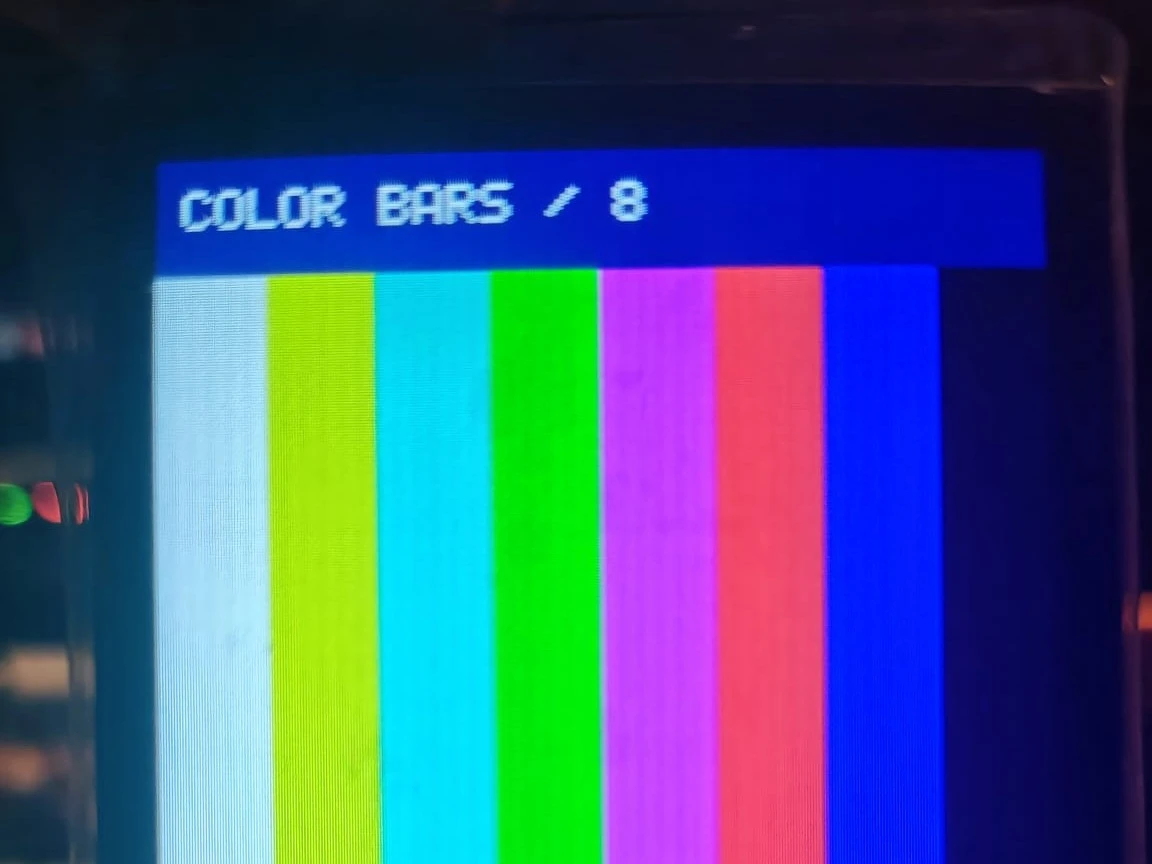
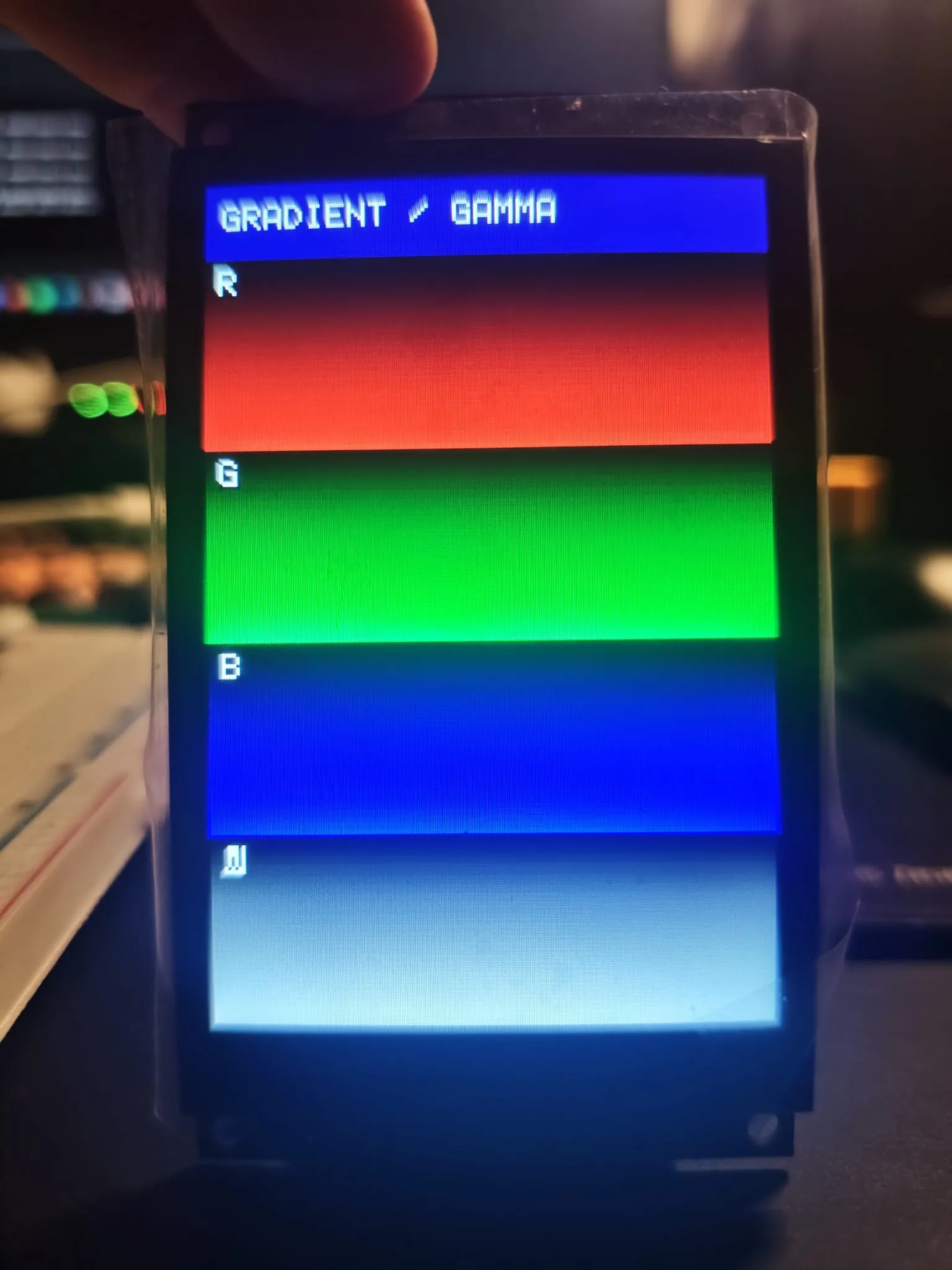
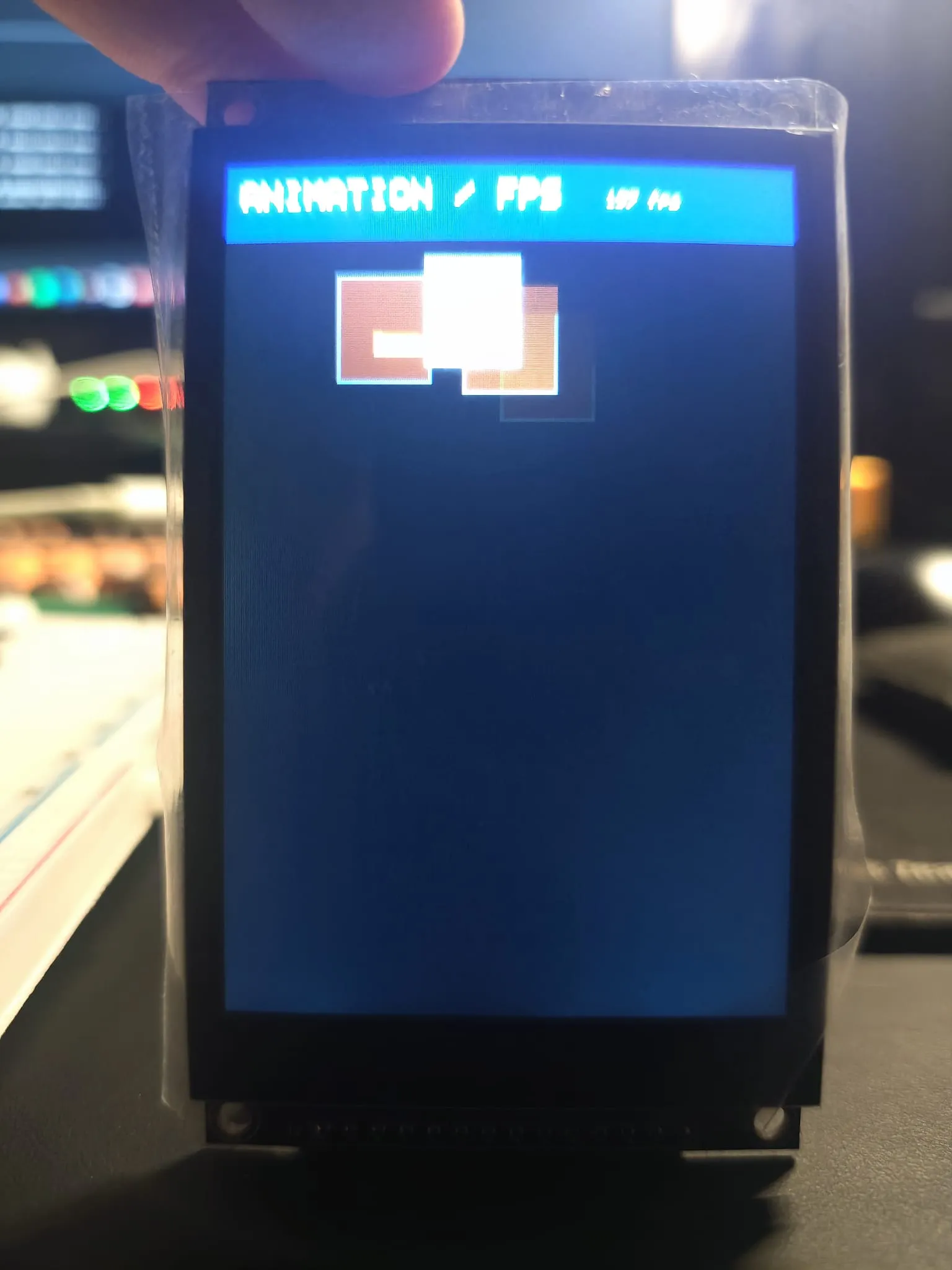
De eerste upload werkte. Kleurbalken, gammaverloop, hardware-informatie en de stuiterende doos verschenen. De teller gaf ongeveer 60 fps, maar de bewegende doos laat zichtbare sporen achter.
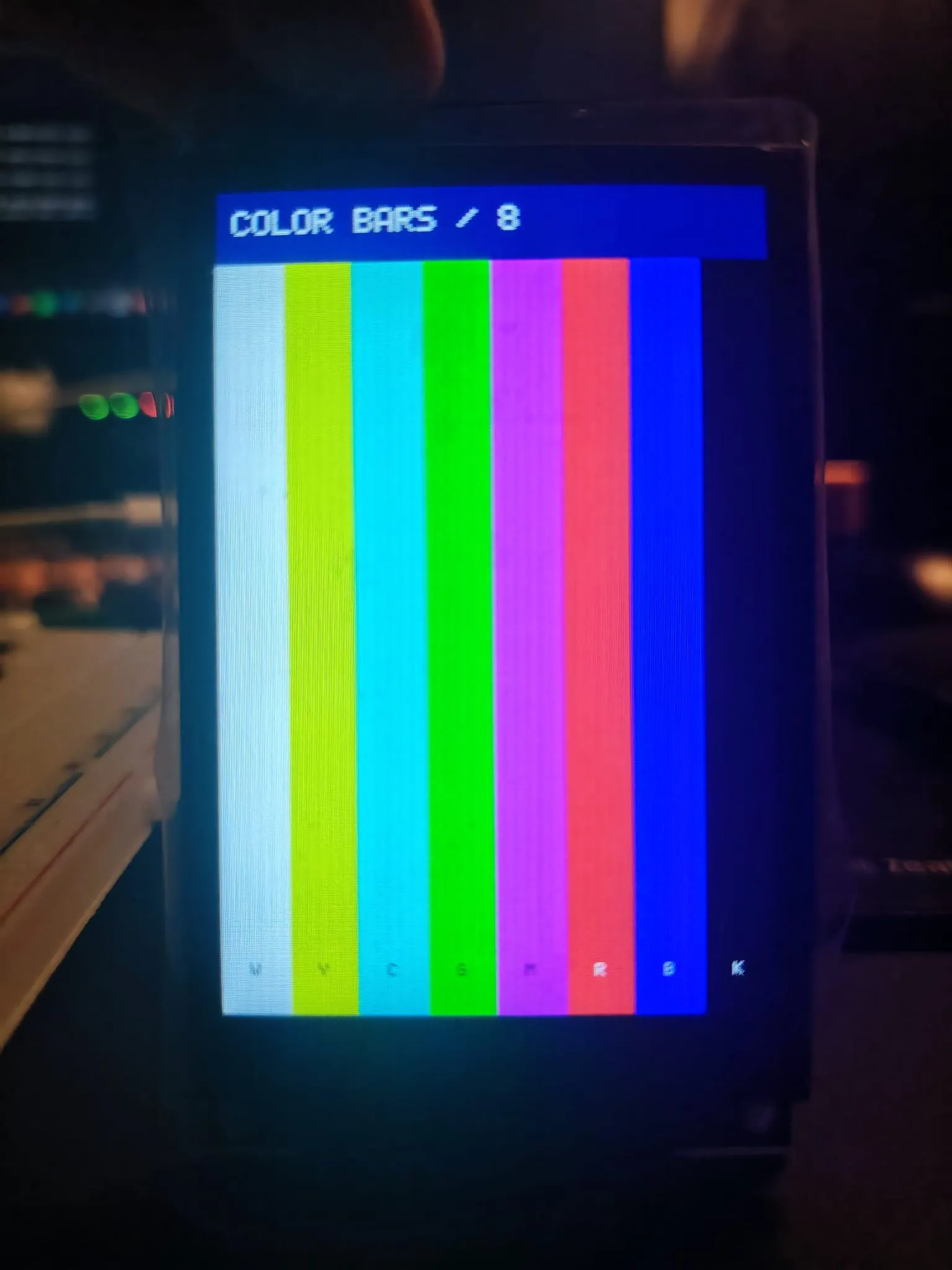
De informatiepagina print:
- SPI-klok: 40 MHz, mode 0.
- Volledig scherm vullen: 71.747 µs voor 307.200 bytes, ongeveer 4,3 MB/s.
- Touchcontroller: FT6336U op I2C-adres 0x38.
- Paneel-ID:
FF FF FF.
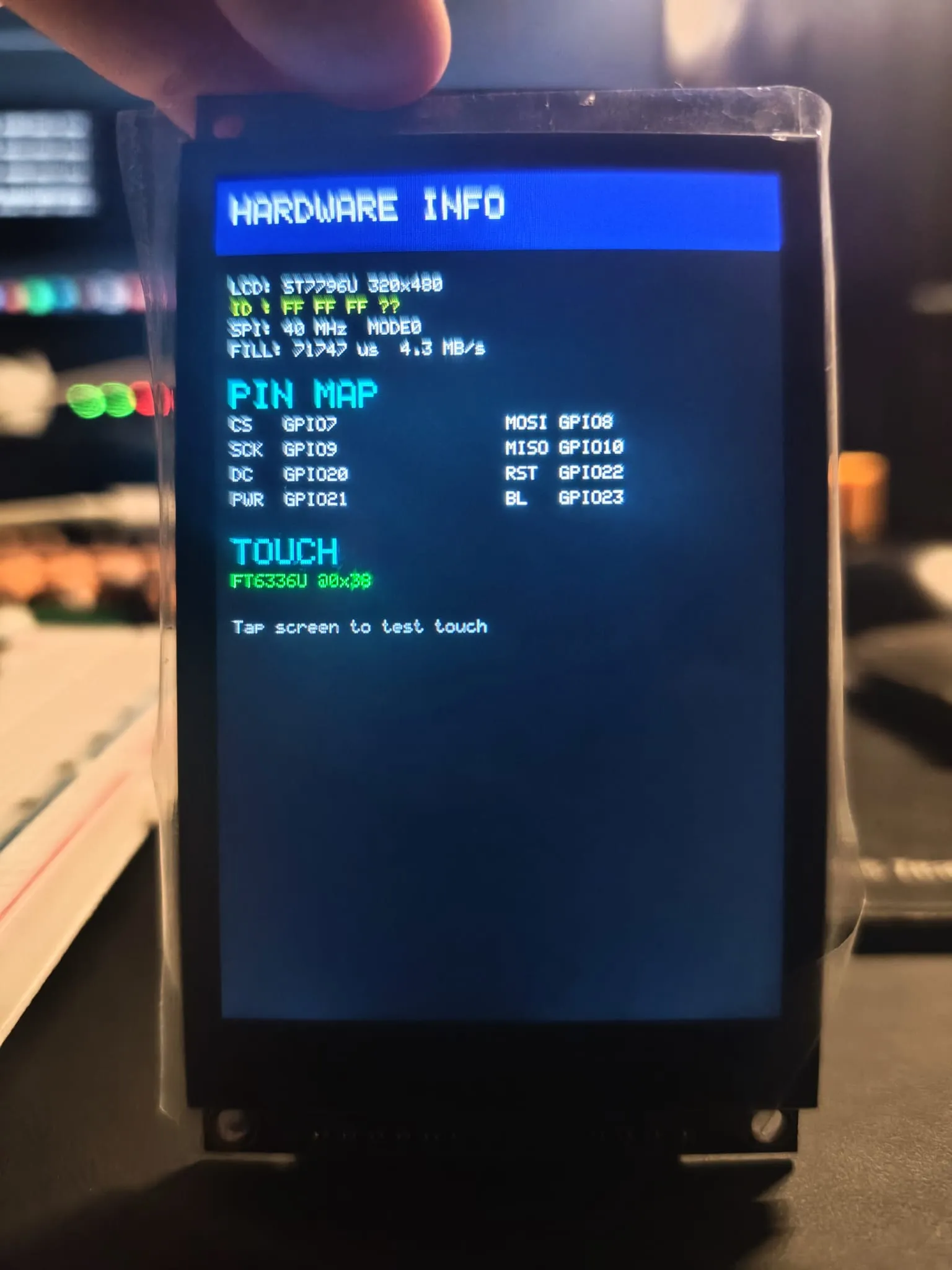
De ID las FF FF FF. De ST7796 stuurt die terug over SDO, en die lijn is niet aangesloten; hij wordt alleen voor identificatie gebruikt.
Wat dit laat zien
Een volledige refresh op 40 MHz kost 71,7 ms. Statische pagina’s passen daarin; video niet. Gedeeltelijke updates zijn veel goedkoper: de stuiterende doos herschrijft per frame twee kleine rechthoeken, dus de loop haalt ongeveer 60 updates per seconde. Dat is de loopsnelheid van de sketch, niet de responstijd van het paneel. De sporen wijzen waarschijnlijk op pixelresponstijd; die heb ik niet gemeten.
De touchcontroller antwoordt op 0x38, dus de I2C-kant is ook goed aangesloten. Pixels over SPI, touch over I2C, allebei werkend bij de eerste build.